
You've got the calls, the jobs, the appointments booked. Then you open the website report and realise the important service pages are behaving like a shy apprentice at a busy job site, present somewhere, but not quite where they should be.
That's usually where an XML sitemap for SEO enters the conversation. Not as a magic wand, not as a ranking cheat, just as a tidy way of telling search engines which pages matter, which ones are worth crawling, and which bits of the site need a bit more help than your internal links are currently giving them. For a UK plumber, solicitor, dentist, or multi-location service business, that can be the difference between “Google will sort it out eventually” and “why is the phone still quiet?”
Table of Contents
- Why Your Service Pages Are Getting Lost
- What an XML Sitemap Actually Does
- The Honest SEO Benefits and Limitations
- Sitemap Structure Best Practices That Actually Matter
- What to Deliberately Leave Out of Your Sitemap
- Creating and Submitting Your Sitemap Step by Step
- Common Sitemap Problems and How to Diagnose Them
- Your Ongoing Sitemap Audit Checklist
Why Your Service Pages Are Getting Lost
The classic scene is a trades yard on a Monday morning. The phone's ringing, vans are moving, and somebody's just asked whether the new boiler repair page is live yet. The answer is yes, technically. The awkward bit is that Google seems to be wandering about like it's never seen the place before.
That's how a lot of small service businesses get caught out. The site has a homepage, a few service pages, maybe a location page or two, and a blog nobody has touched since the last bank holiday. On paper, everything exists. In practice, the pages that make money are buried under thinner pages, duplicate versions, or a navigation structure that made perfect sense to the person who built it and less sense to the crawler doing the rounds.
For a local solicitor, that might mean a family law page never gets the attention it deserves. For a multi-location plumber, it might mean the Leeds page and the Manchester page sit there looking handsome while Google keeps revisiting the blog instead. A site can be perfectly usable to humans and still be a bit of a maze to search engines.
That's the frustration an XML sitemap helps with. It doesn't fix weak content, and it won't rescue a page nobody wants. But it can make your important URLs easier to find, which is rather useful when you'd like those URLs to be found on purpose instead of by accident.
What an XML Sitemap Actually Does

Think of an XML sitemap as a polite A to Z of your website handed to Googlebot at the door. It's not the site itself, and it's definitely not a secret lever for rankings. It's a machine-readable file that lists URLs you want search engines to discover, crawl, and understand a bit more efficiently.
Google's own sitemap guidance says a sitemap helps it crawl a site more efficiently, and Search Console expects the file to be accessible to Googlebot before you submit it through the Add a new sitemap box in the Sitemaps report Google Search Central sitemap overview. That's the plain-English version. The slightly nerdier version is that it gives crawlers a cleaner route into the pages you care about, especially when your internal linking isn't perfect or your site has grown a bit lopsided.
XML sitemap vs HTML sitemap
An XML sitemap is for search engines. An HTML sitemap is for visitors. The HTML version can be handy on a brochure site, but it's a navigation aid, not a crawl file. Mixing them up is like sending the decorator in to do the electrician's job, charming idea, wrong trade.
An XML sitemap normally contains a <urlset> wrapper with entries for each page. Inside each entry, the most useful tags are:
<loc>, the absolute page URL you want crawled.<lastmod>, the last meaningful update date.<changefreq>, a hint about how often content changes.<priority>, a hint about relative importance.
Key point: a sitemap is a hint, not a guarantee. Google may use it to discover pages and revisit updates, but it still decides what gets crawled and indexed.
The practical benefit for a small business is simple. If you've got a service page for emergency roof repairs, you'd rather Google found that page quickly than eventually, after rummaging through twenty internal links and a stale blog archive. The sitemap is the polite handover note.
The Honest SEO Benefits and Limitations
The strongest case for an xml sitemap for seo is coverage, not glamour. Google's published example data, summarised by Search Engine Land, showed that by October 2008 about 35 million XML sitemaps had been published containing several billion URLs, with XML as the dominant format at 77% and 78% of URLs discovered through sitemaps first rather than via normal discovery Search Engine Land's summary of the Google study. That's old data, but it still tells the right story. Sitemaps have long been about discovery and crawl control, not about waving a wand over rankings.
What they do well
For a local service business, the upside is practical. New service pages get a clearer path to discovery. Location pages are less likely to be missed. Multi-location sites can keep a better grip on coverage when pages are added, moved, or removed. And Search Console reporting is easier to interpret when the sitemap only contains pages you want indexed.
Google's sitemap docs also make the distinction clear, sitemaps affect crawl and indexing efficiency, not rankings themselves Google Search Central sitemap overview. That distinction matters, because it stops people treating the file like a lucky charm.
What they do not do
An XML sitemap won't force indexing. It won't override noindex. It won't make thin content respectable just because you handed it over neatly in XML. And it won't rescue duplicate pages that exist mainly because someone wanted every filter combination under the sun.
A sitemap should point at pages worth indexing, not act as a landfill for anything that has a URL.
That's where the white hat, grey hat, and black hat lines get useful. White hat sitemap use means clean canonical URLs, accurate update data, and only the pages that deserve search visibility. Grey hat behaviour is shoving in every parameter variant because it feels thorough. Black hat is worse, it's submitting spammy, noindexed, or junk pages and hoping the machine gets confused. It usually doesn't. It just makes the diagnostics messier.
Sitemap Structure Best Practices That Actually Matter
A tidy sitemap starts with boring but important constraints. Google requires sitemap URLs to be absolute and canonical, and the file must stay within the standard limits of 50,000 URLs or 50MB uncompressed Google's sitemap build guidance. Most local businesses won't get near those limits. Multi-location SMEs, on the other hand, can drift towards them faster than they expect, especially once service pages, town pages, blog posts, and media files all start piling in.
Split by page type, not by optimism
The neatest setup is usually a sitemap index with child sitemaps for different sections, for example services, locations, blog content, and images. That makes debugging far easier. If your location sitemap suddenly drops in size after a CMS update, you'll notice. If everything lives in one giant file, good luck spotting the problem without a strong cup of tea and a headache.
Google also recommends submitting the sitemap in Search Console or referencing it in robots.txt, which helps Googlebot report access timing and processing errors Google's sitemap build guidance. That's useful operationally, because you can see when discovery starts drifting.
Core rules for structure
| Rule | Limit or Requirement | Why It Matters |
|---|---|---|
| Absolute URLs only | Use canonical, full URLs | Prevents ambiguity and duplicate discovery paths |
| Keep it canonical | Include the version you want indexed | Stops crawl waste on alternate versions |
| Stay within file limits | 50,000 URLs or 50MB uncompressed Google's sitemap build guidance | Avoids hard failures and split-file chaos |
| Use a sitemap index for larger sites | One index, multiple child files | Makes maintenance and troubleshooting cleaner |
Include accurate lastmod |
Only when the page really changed | Helps signal freshness without fiction |
Useful extras, used sensibly
If you run galleries, use image extensions. If you embed videos, include video extensions. If you operate across English, Welsh, or Scottish markets, xhtml:link can support hreflang. Just keep the file honest. lastmod as a lie is one of the fastest ways to turn a useful hint into noise. Google doesn't need theatre, it needs truth.
What to Deliberately Leave Out of Your Sitemap
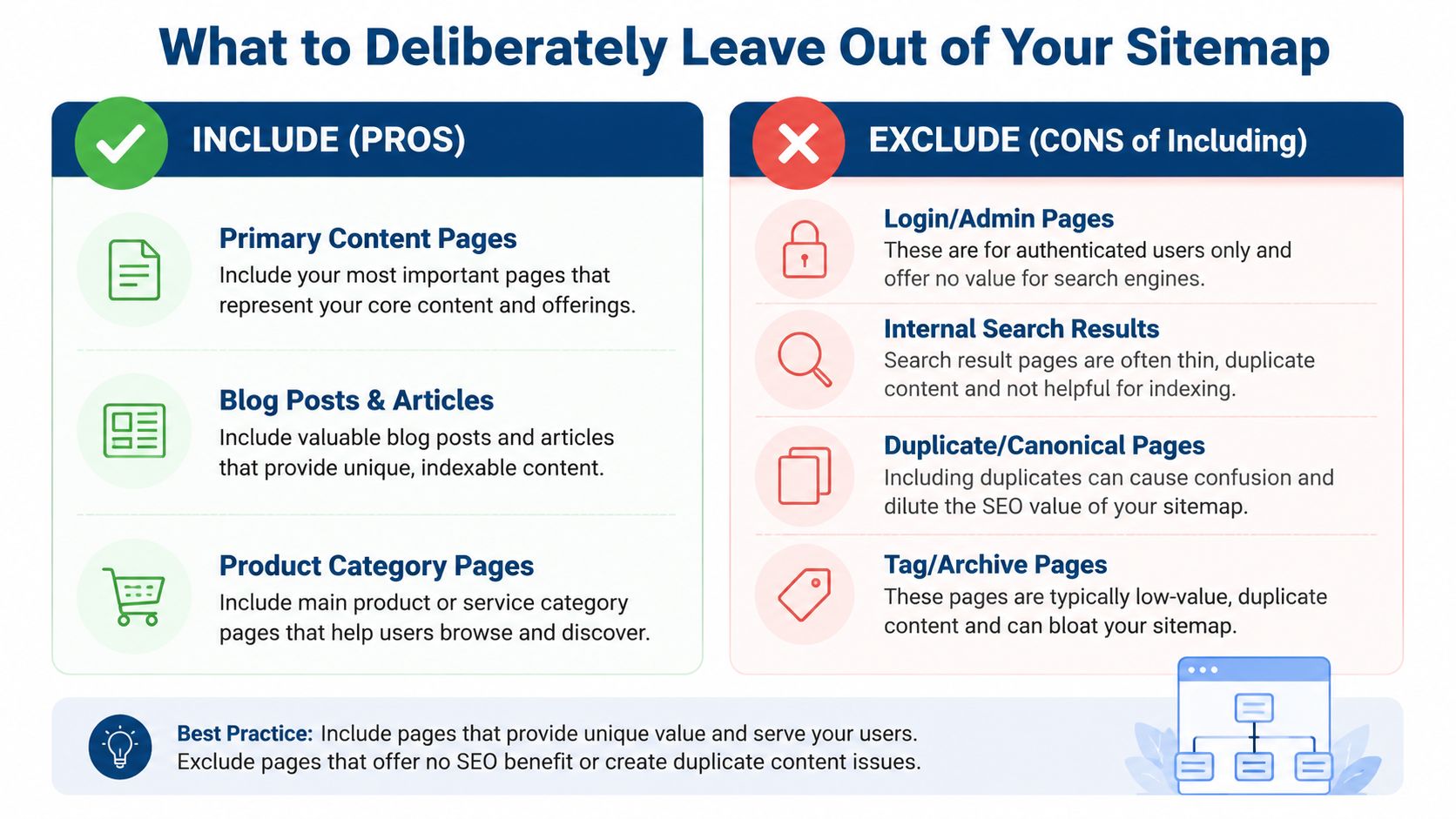
A smaller sitemap is usually a better sitemap. That goes against the instinct some people have, which is to include anything that can be crawled and hope that sheer volume looks impressive. It doesn't. It mostly makes the sitemap less useful.
Moz's sitemap guidance is blunt on the bit many guides politely ignore, utility pages should be blocked or noindexed and kept out of the XML sitemap, while only true search landing pages belong in it Moz XML sitemap guidance. That includes the obvious rubbish and the slightly less obvious stuff that still clutters diagnostics.
Keep these out
- Login and admin pages, because customers don't need to land there from Google.
- Internal search results, because search engines don't need a second search engine.
- Duplicate or canonical alternatives, because one URL is enough when it's the right one.
- Tag and archive pages, unless they're useful landing pages and not thin leftovers.
- Thank-you pages and utility pages, because they're part of the journey, not the destination.
Parameter variants are another common mess. They often look tidy in a CMS and terrible in a sitemap. Submitting every crawlable URL is a grey-hat instinct dressed up as diligence, and it muddies reporting fast.
A useful way to think about this is by page intent. A page should be in the sitemap if you'd be happy for it to rank, attract clicks, and represent the business properly. If not, leave it out and let it do its job elsewhere.
For a deeper look at modelling the behaviour of changing systems, ARIMA vs ETS vs GARCH models is a useful comparison, because sitemap maintenance is a bit like time-series work, you're watching patterns, drift, and sudden movement rather than admiring a static snapshot.
A 12-page solicitor's site might only need service pages, a few core location pages, and a couple of useful articles. A 240-page plumbing group might need separate service, location, and blog sitemaps, but still shouldn't include admin screens, tag archives, or duplicate city variants nobody would want to land on in the first place. Clean coverage beats bloated coverage every time.
Creating and Submitting Your Sitemap Step by Step
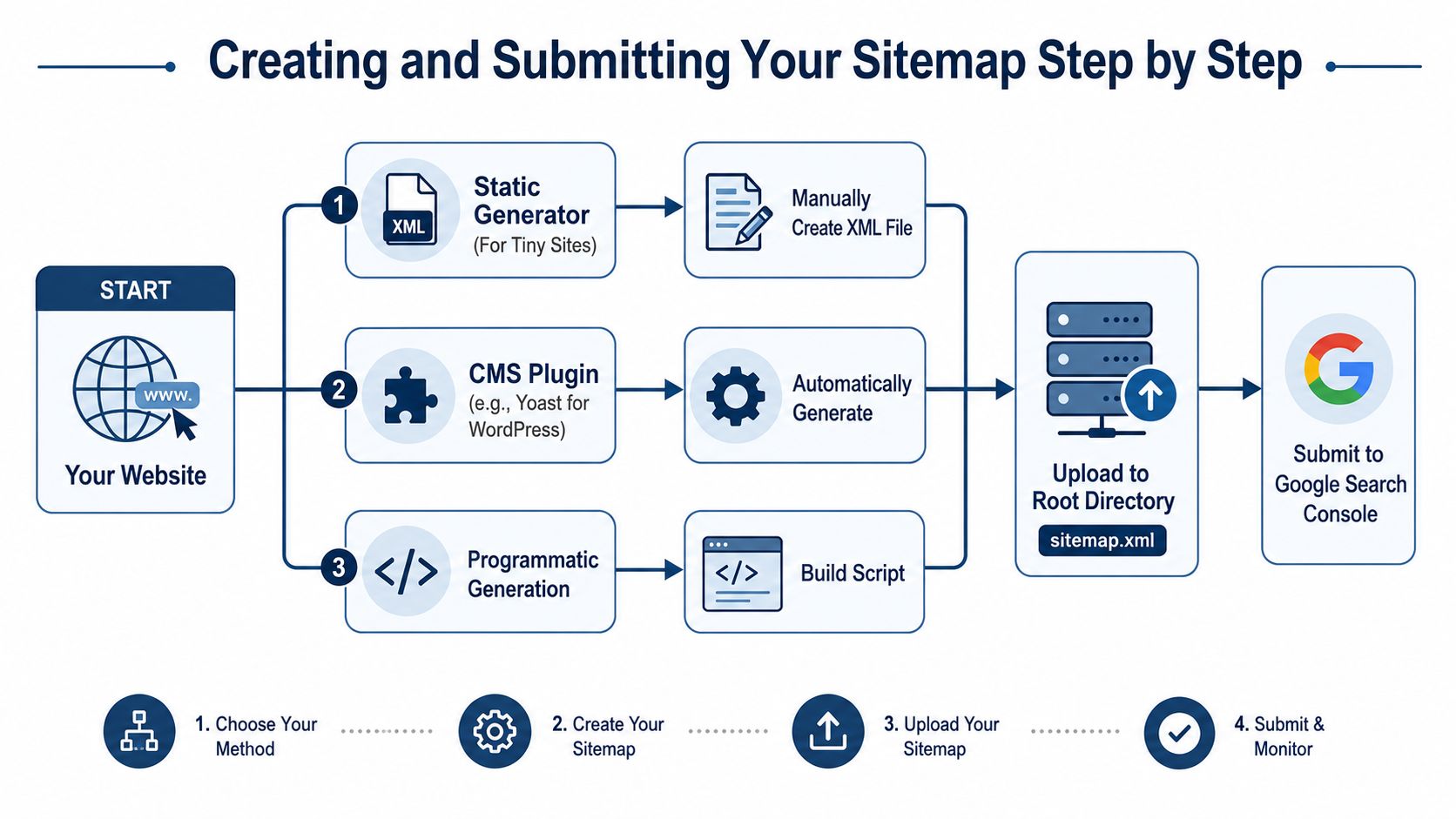
A tiny brochure site can get away with a static generator. A WordPress site is usually better off with a reputable SEO plugin that updates the file automatically. Larger builds, especially multi-location or content-heavy sites, are usually better served by programmatic generation so the sitemap reflects the actual site rather than last Tuesday's version of it.
Build it in the right way for the site size
For a simple site, a static XML file is fine if you're disciplined about maintenance. For a CMS-driven site, automation wins because the sitemap stays aligned with live content. For a larger estate, dynamic generation plus a sitemap index keeps the structure manageable and avoids the old “someone forgot to refresh the file” problem, which is a thrilling way to lose trust in your own process.
Submit it properly
Google's Search Console flow is specific. First, make sure the sitemap is reachable without login barriers. Then test accessibility, paste the URL into the Add a new sitemap box, and click Submit Google Search Central sitemap overview. If that sounds quaintly manual in 2026, that's because it is. Still, it works.
You can also reference the sitemap in robots.txt, which helps discovery from the crawler side and gives Googlebot another clear route to the file Google's sitemap build guidance. The file needs to be easy to fetch, not hidden behind a login, firewall rule, or some over-enthusiastic staging lock.
If you want a quick sanity check before you hit submit, check your sitemap with a validator or crawler and make sure the URLs are live, canonical, and behaving as expected. check your sitemap is a handy starting point when you'd rather spot a duff URL before Google does.
Submission isn't the end of the job. It's the point where the monitoring starts to matter.
Common Sitemap Problems and How to Diagnose Them
A Could not fetch message usually means Googlebot cannot reach the file cleanly. Check robots blocking, access restrictions, and whether the sitemap URL resolves properly. If several sitemaps start failing at once, stop looking at page content and check hosting or DNS stability instead.
A sudden drop in submitted URLs usually points to a CMS change, a deployment, or a template update that changed which pages get emitted. Compare the live sitemap with the current site structure and the most recent releases. That is usually quicker than guessing your way through the issue.
If the indexed count is much lower than submitted, the sitemap file is rarely the primary problem. Canonicalisation, internal linking, or content quality is usually doing the blocking. Google can see a URL in the sitemap and still refuse to index it, which means the file is fine and the page is not doing enough work.
Duplicate sitemaps in Search Console can create noise too. That often happens after a redesign, when old files are left live, or when an index file and a standalone file both cover overlapping sections. Pick one structure, clear out the rest, and keep the reporting surface area sensible.
A proper technical SEO audit helps here because sitemap errors rarely sit in isolation. They usually sit next to crawl traps, weak canonicals, or messy deployment habits. If the same fetch problem keeps returning across several files, escalate it. At that point it is probably a hosting or access issue, and somebody needs to sort the infrastructure before anything else can be trusted.
The same practical rule applies to content quality. If you are checking whether pages deserve to stay in the sitemap, how to humanize AI text for SEO is a useful reminder that clarity still matters, even when machines are part of the audience. A sitemap should only surface URLs you want crawled, indexed, and monitored.
Your Ongoing Sitemap Audit Checklist
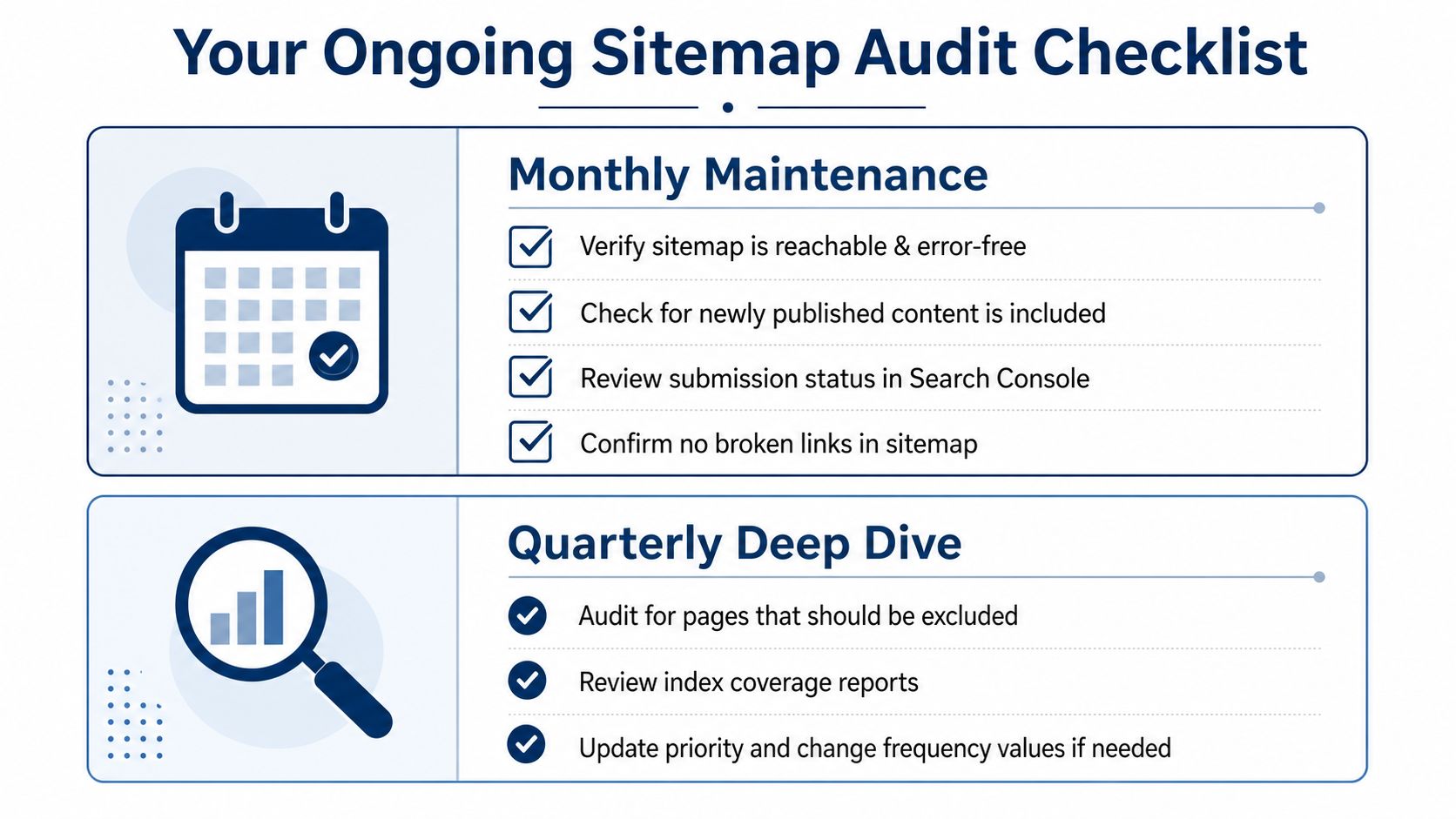
A sitemap is healthiest when it's treated like a living coverage layer, not a one-off file that got blessed during a site launch and then ignored for two years. A monthly check should verify that the file is reachable, newly published pages are present, Search Console shows the right submission status, and there aren't broken links lurking in the list.
Quarterly, go deeper. Review which pages should be excluded, compare submitted versus indexed coverage, and sanity-check lastmod values so they still reflect reality. If a redesign, migration, or CMS update has happened, re-audit immediately rather than waiting for the calendar to catch up.
For a practical angle on staying readable while keeping search performance intact, how to humanize AI text for SEO is a useful reminder that clarity still matters, even when machines are part of the audience. The same applies here. A good sitemap is clear, current, and brutally selective.
That's the difference between a file that merely exists and a file that earns its keep. Sort the coverage, keep the junk out, and watch the site like a grown-up, because the competition is still busy submitting every last thing with a URL and calling it strategy.
If you want a second pair of eyes on your sitemap structure, exclusions, or indexation drift, get DigiVisi Ltd to take a proper look at it. You'll get practical technical SEO advice, not fairy dust, and a plan that's built for real UK service businesses, not theoretical ones.