Skip to content
A Manchester solicitor is staring at a half-finished schema implementation in Search Console. The service page is well written, the internal links are sensible, and the business details are visible, yet the expected enhancement hasn't appeared. The temptation is obvious: add more properties, copy an FAQ block across the site, and mark up every service the firm might conceivably handle.
That's how tidy SEO work turns into structured-data soup.
Schema markup for services isn't a magic ranking switch. It's an entity-consistency discipline. Your markup should tell Google, clearly, which service you provide, where you provide it, and which business provides it. Google's structured data introduction states that markup must match visible content, include required properties, sit on the page it describes, remain accessible to Googlebot, and use the most specific applicable types.
The practical difference matters across UK trades, professional firms and service-led e-commerce pages. A plumber needs to distinguish boiler repairs from general plumbing. A solicitor needs to separate conveyancing from litigation. A multi-location practice needs to connect each service with the correct office or service area. The code is only the delivery mechanism. The work is keeping the business entity, service entity and local signals aligned.
Direct ranking evidence for structured data is hardly a licence to promise miracles. The stronger argument is indirect: accurate markup can support eligibility for enhanced search features, reinforce business understanding, align local signals and give machine systems cleaner facts to retrieve. Google's public guidance remains the standard. GOV.UK's publishing manual also documents schema.org structured data on government pages, which shows that structured markup has become part of mainstream web publishing, not a curious trick reserved for online shops.
Table of Contents
- Why Service Schema Matters for UK Businesses Right Now
- Choosing the Right Schema Types and Properties
- Building Your JSON-LD Block Step by Step
- Service LocalBusiness WebPage and FAQ Schema Compared
- Validating and Testing Your Markup Properly
- Matching Schema With Google Business Profile and Multi-Location Data
- Common Pitfalls and the White Grey and Black Hat Line
Why Service Schema Matters for UK Businesses Right Now
The Manchester solicitor in our opening example doesn't need a larger JSON-LD block. They need a more coherent one. The page should identify conveyancing as the primary service, connect it to the firm, describe the relevant location or service area, and avoid claiming offers, ratings or answers that visitors can't see.
That distinction becomes important as search results become more crowded. Position zero is under pressure from answer features, local results, business panels and AI-generated summaries. Structured data doesn't guarantee inclusion in any of them, and it certainly doesn't exempt a weak page from competing on relevance, authority and usefulness. It does, however, reduce the amount of guesswork required to interpret a page.
Clarity beats code volume
A Bristol boiler repair page with a clear Service entity gives search engines a cleaner description than a page carrying several generic business blocks and a list of hidden services. The same applies to a Cardiff accountant, a Leeds roofer or a Glasgow landscaping firm. The useful question is not “How much schema can we add?” but “What can this page prove?”
Google recommends JSON-LD, although it supports JSON-LD, Microdata and RDFa. Eligibility still depends on Google's guidelines, not on schema.org vocabulary alone. A technically valid block can remain ineligible if it misrepresents the page, omits required information for a relevant feature or uses a type that doesn't fit the visible content.
Practical rule: Mark up the page you have, not the business you hope Google will imagine.
For local service businesses, the potential benefits compound through consistency. A service page can support clearer relationships between the firm, its services, its locations and its published business details. That can help richer listings, local-pack alignment and machine retrieval, but only when the underlying page is accurate and crawlable.
The rest is implementation rather than theatre. You'll see how to choose types, build a JSON-LD graph, decide whether FAQPage earns its place, validate rendered output, reconcile schema with Google Business Profile and separate honest mistakes from grey- and black-hat shortcuts.
Choosing the Right Schema Types and Properties
A Bristol plumber's emergency boiler repair page should describe the service, the firm providing it and the area covered. The practical challenge is entity consistency, not finding a bigger JSON-LD block. Choose types and properties from the visible page, then keep those details aligned with the wider business profile.
Google's LocalBusiness documentation recommends using the most specific subtype that matches the business, and its general guidance recommends JSON-LD. For a standalone service page, Service is usually the appropriate primary type. Treat that as the page's commercial entity, while LocalBusiness identifies the provider where the relationship is relevant.
Bristol plumber example
Suppose the page describes boiler fault diagnosis, emergency call-outs, Bristol as the service area and genuine pricing information. Use:
@type: Servicefor the page's main commercial subject.namefor a plain-language name such as “Emergency Boiler Repair”.serviceTypefor the specific work, rather than a broad label such as “plumbing”.providerto connect the service with the plumber'sLocalBusinessentity.areaServedonly for places the business covers.offersorpriceSpecificationonly where the page visibly states a real price or pricing method.
The provider's name, address, phone number and opening hours must match the business details shown on the site and maintained across its local presence. Avoid Thing because it is easy to add. A generic type removes the distinction that Service markup should communicate.
Manchester solicitor example
A Manchester solicitor offering conveyancing follows the same entity structure. Set serviceType to an accurate conveyancing description, use areaServed for Greater Manchester and named boroughs only where the firm covers them, and add priceSpecification when the page displays a genuine fee or pricing basis.
A fixed fee that appears nowhere on the page has no business in the markup. Nor should a firm list every borough merely to collect location terms. Search engines are not impressed by a postcode treasure hunt.
Property selection table
| Property | Bristol Plumber, Boiler Repair | Manchester Solicitor, Conveyancing | Generic UK Service |
|---|---|---|---|
| Primary type | Service | Service | Service |
serviceType | Emergency boiler repair | Conveyancing service | Specific service name |
provider | The actual plumbing business | The actual solicitor's firm | Consistent business entity |
areaServed | Bristol and genuine nearby areas | Greater Manchester and genuine named boroughs | Only evidenced service areas |
offers | Use only for a visible offer | Use only for a visible fee or package | Omit when no offer exists |
AggregateRating | Only with genuine page-supported data | Only with genuine page-supported data | Omit when the underlying data isn't present |
The working rule is simple. Start with Service. Connect LocalBusiness when the page represents a location or service-area relationship. Add Offer or AggregateRating only when the page contains the underlying information and it can be verified. Google's Organisation guidance supports separating brand-level organisation data from location-level and service-level entities, which helps firms with several branches keep their entities distinct and consistent.
Building Your JSON-LD Block Step by Step
Start with one accurate service entity, then connect it to the page and business. Schema is an entity-consistency discipline, not a code snippet exercise. The safest approach is white-hat Service markup that reflects visible content. Adding FAQ markup to every page is grey-hat territory, while marking up every conceivable fact is a black-hat trap.
Step one with a minimal Service entity
Use a fresh example rather than repeating the boiler repair case. This connected graph describes a residential conveyancing page for a Manchester solicitor.
<script type="application/ld+json">
{
  "@context": "https://schema.org",
  "@type": "Service",
  "name": "Residential Conveyancing",
  "serviceType": "Conveyancing service",
  "provider": {
    "@type": "LocalBusiness",
    "name": "North West Law"
  }
}
</script>
@context identifies the vocabulary and @type identifies the entity. name should match the visible page subject. serviceType adds useful precision, while the provider name must match the business identity used across the page and site.
Step two by adding proven details
Add information only when the rendered page supports it.
<script type="application/ld+json">
{
  "@context": "https://schema.org",
  "@type": "Service",
  "@id": "https://example.co.uk/residential-conveyancing/#service",
  "name": "Residential Conveyancing",
  "serviceType": "Conveyancing service",
  "provider": {
    "@id": "https://example.co.uk/#business"
  },
  "areaServed": [
    {
      "@type": "AdministrativeArea",
      "name": "Greater Manchester"
    },
    {
      "@type": "City",
      "name": "Salford"
    }
  ],
  "serviceOutput": "A completed residential property transaction",
  "offers": {
    "@type": "Offer",
    "priceSpecification": {
      "@type": "PriceSpecification",
      "price": "Displayed on page",
      "priceCurrency": "GBP"
    }
  }
}
</script>
The price value is illustrative structure, not a licence to publish text as a price. Replace it with a real visible price or remove offers. The same rule applies to areaServed and `serviceOutput. Use only facts the page states clearly.
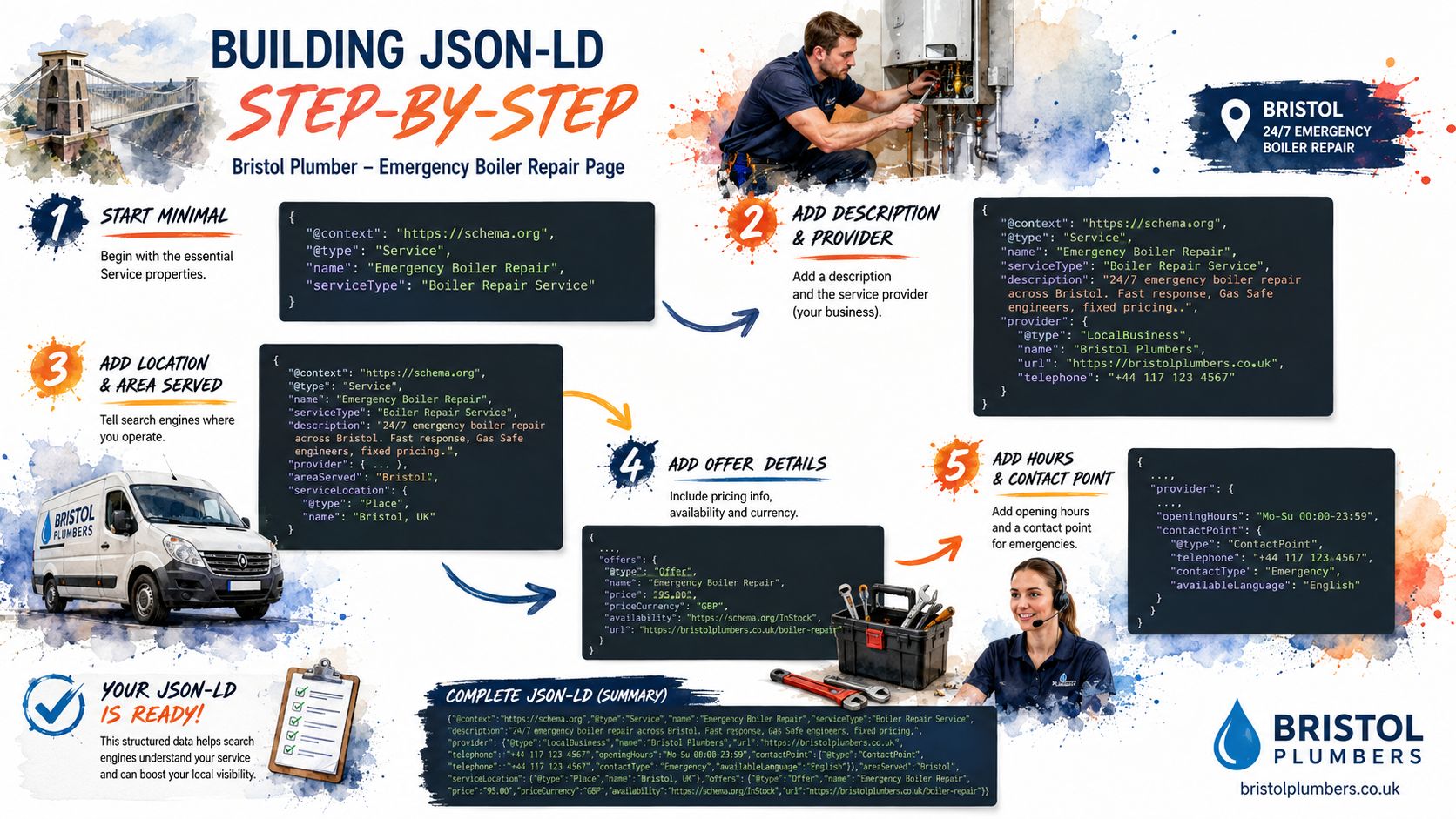
Step three with a connected graph
A connected graph keeps the page, provider and service aligned instead of scattering unrelated objects across separate scripts.
<script type="application/ld+json">
{
  "@context": "https://schema.org",
  "@graph": [
    {
      "@type": "WebPage",
      "@id": "https://example.co.uk/residential-conveyancing/",
      "url": "https://example.co.uk/residential-conveyancing/",
      "name": "Residential Conveyancing in Greater Manchester",
      "about": {
        "@id": "https://example.co.uk/residential-conveyancing/#service"
      }
    },
    {
      "@type": "LocalBusiness",
      "@id": "https://example.co.uk/#business",
      "name": "North West Law",
      "telephone": "0161 000 0000",
      "address": {
        "@type": "PostalAddress",
        "addressLocality": "Salford",
        "addressCountry": "GB"
      }
    },
    {
      "@type": "Service",
      "@id": "https://example.co.uk/residential-conveyancing/#service",
      "name": "Residential Conveyancing",
      "serviceType": "Conveyancing service",
      "provider": {
        "@id": "https://example.co.uk/#business"
      }
    }
  ]
}
</script>
Step four for breadcrumbs and offers
Add BreadcrumbList only when it matches the visible navigation exactly. Add Offer only when the page displays the corresponding offer. One misplaced brace or comma can invalidate the block, so run the final JSON through an online JSON formatter before publishing.
Keep the structured data in one script tag, placed in the head or just before the closing body tag. Validate the rendered page, not merely a helper function in the CMS. Remove any property that the live page cannot support. Neat code cannot rescue invented facts.
Service LocalBusiness WebPage and FAQ Schema Compared
These four types have different jobs, and treating them as interchangeable is how service sites acquire unnecessary markup.
Service describes the work being offered. It belongs at the centre of a standalone service page such as “Emergency Boiler Repair in Bristol” or “Residential Conveyancing in Manchester”. LocalBusiness describes the business entity, particularly where the page represents a physical office or a genuine service-area operation.
WebPage describes the document that contains the content. It can sit in the same connected graph, but it shouldn't replace the service entity or become an excuse to label every page with an indiscriminate pile of types.
FAQPage is the awkward one. The GOV.UK schema guidance supports page-appropriate structured data, while UK commentary on service pages makes the practical point clearly: FAQ markup belongs only where the questions and answers are visible, specific and part of the page.
A defensible decision table
| Scenario | Recommended Type | Grey or Black-Hat Risk |
|---|---|---|
| Standalone boiler repair page | Service | Low, if it matches visible content |
| Solicitor branch page | Service plus LocalBusiness | Low, if branch details are accurate |
| General service document | WebPage linked to the subject | Low, when relationships are clear |
| Visible conveyancing questions | FAQPage with matching on-page answers | Low |
| FAQ text hidden in code only | No FAQPage | High |
| Generic FAQ copied across every location | Usually omit or rewrite | Grey-hat risk |
| Marking up every possible service | No, use only evidenced entities | Black-hat territory |
A visible accordion can still be visible content if users can access it on the page. A Q&A block that exists only in JSON-LD is a gamble. FAQ-everywhere is the grey-hat habit to retire. It looks industrious, but it often creates duplication and overclaiming rather than clarity.
Validating and Testing Your Markup Properly
Copying a snippet into a tester isn't a validation workflow. It checks a fragment, while your users and Google encounter a rendered page shaped by templates, scripts, redirects and content changes.
Start with the rendered page
Use a JavaScript-aware crawler such as Screaming Frog or Sitebulb. A headless-browser crawl can also confirm whether the JSON-LD exists in the final DOM after scripts run. Check the canonical URL, response status, indexability and the actual entities exposed on the page.
A CMS preview proves very little. A plugin may generate markup in the editor while a template strips it from the live output. A migration may also leave old business details in one location page and current details in another.
Use each tool for a defined job
- Rich Results Test: A pass means Google can parse the page and may consider eligible features where the relevant feature supports them. A warning means the page may still function, but you should understand the missing information. A legitimate
Servicepage may show no rich-result eligibility because not every schema type has a dedicated enhancement. That isn't automatically a failure. - Schema Markup Validator: Use it for vocabulary and syntax checks. It can expose malformed JSON, invalid nesting and disconnected entities that a feature-focused tool may not emphasise.
- Search Console URL Inspection: Inspect the live URL, not only the test version. Check whether Google can access and index the page, then confirm that the page is associated with the intended service and provider.
Don't confuse “valid syntax” with “eligible enhancement”. One describes whether the code parses. The other depends on Google's policies and supported result features.
Run the checks after deployment and after major CMS or template changes. The Google structured data policies require a true representation of page content, so validation must include a human comparison between the markup and what visitors can read.
Matching Schema With Google Business Profile and Multi-Location Data
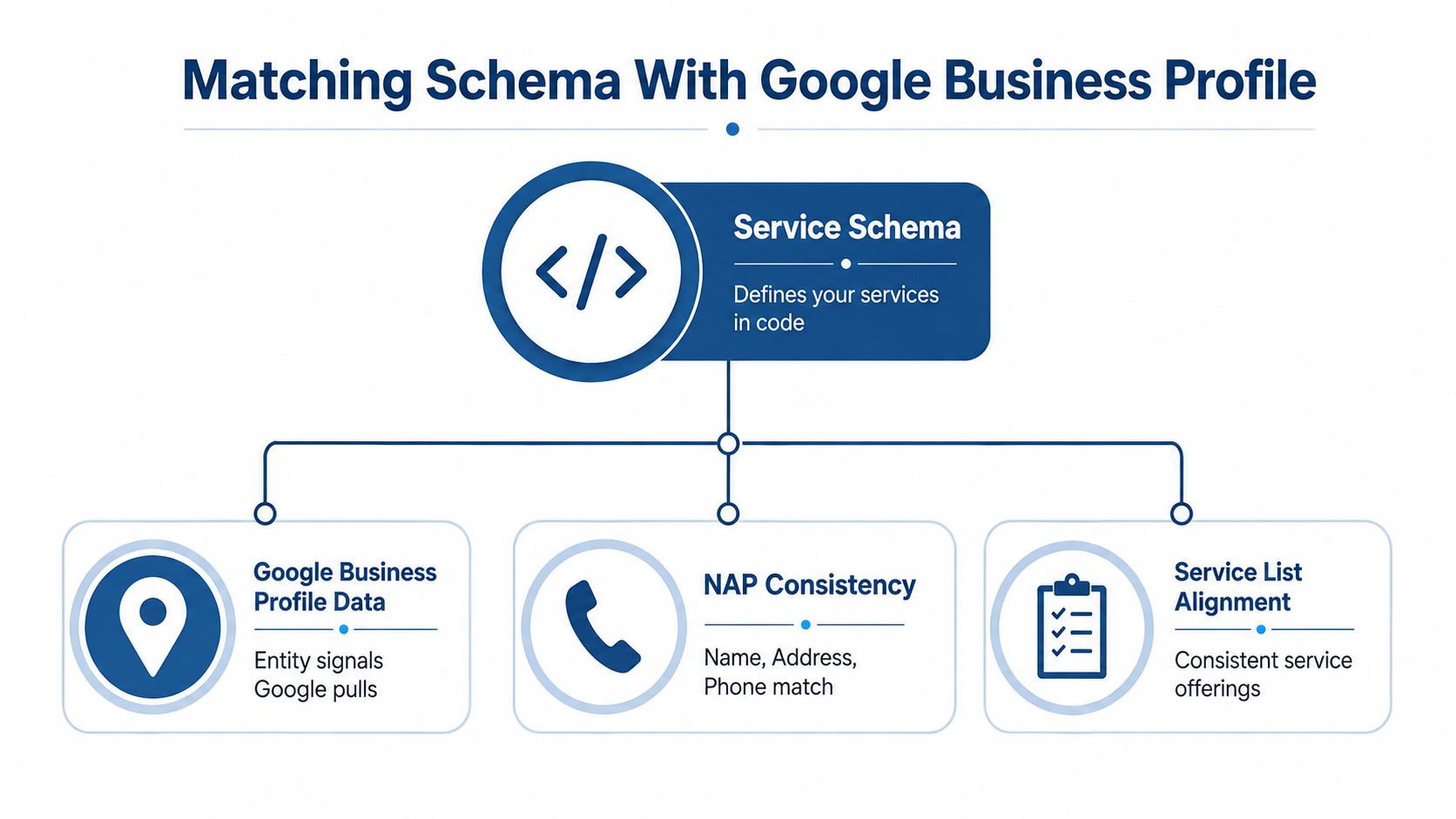
Schema can't repair a confused local entity. It can only describe the entity your website presents, so the website and Google Business Profile need to agree.
Take a Cardiff accountancy practice with three offices. The clean model is one Google Business Profile per eligible location, one LocalBusiness node per location, and a service entity linked to the relevant office or area relationship. Don't clone the same service node across every branch page merely to create a larger-looking graph.
The business name, address, phone number, opening hours and service categories should align between the relevant page, its schema and the profile. Service-area wording should also reflect reality. If one office handles payroll locally while another serves clients remotely across Wales, the site should describe that distinction rather than pretending every branch offers an identical footprint.
Avoid the one-block shortcut
A common setup has one brand profile, separate office profiles and only one LocalBusiness block on the entire website. That creates a relationship problem. Google's Organisation documentation supports separating the organisation from location-level entities, which gives each branch a clearer identity without turning the site into a duplicate-entity factory.
The service node should describe the service. The location node should describe the office. The organisation node should describe the wider firm. Use stable @id values so those entities can be referenced consistently across pages.
Local consistency rule: Schema describes what Google can already see. If your markup contradicts the Business Profile, fix the page and the business data rather than hoping the code wins an argument.
For practical background on the wider local search relationship, review this guide to small business local SEO. It's especially relevant when service areas, branches and office pages overlap.
Common Pitfalls and the White Grey and Black Hat Line
Most schema failures aren't caused by an obscure property. They come from a mismatch between what a business says, what its page shows and what its structured data claims.
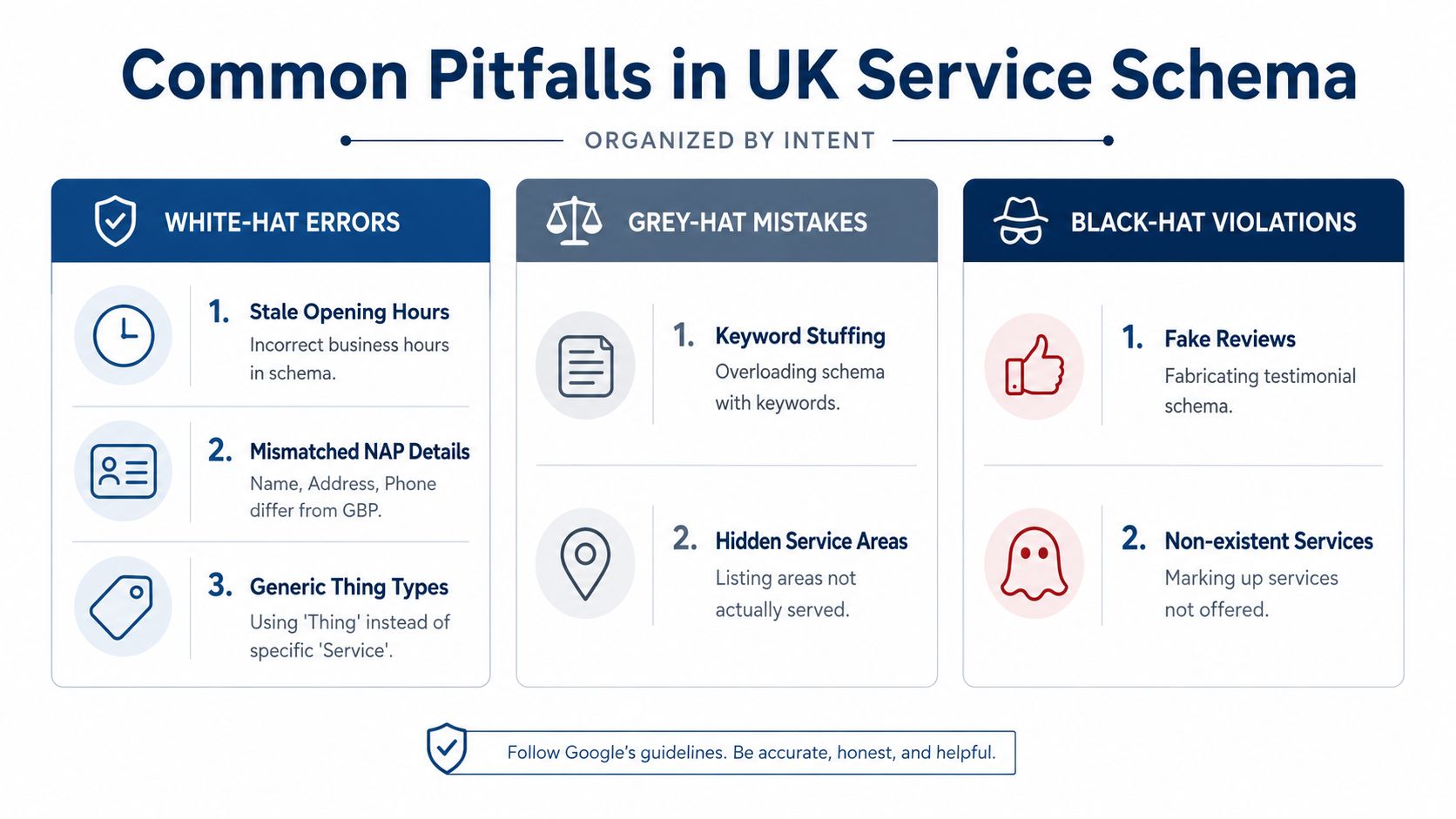
White-hat errors are usually repairable hygiene problems. Grey-hat tactics start with a shortcut and rely on Google ignoring the awkward bit. Black-hat markup invents facts or hides them from users. The intent matters.
White-hat errors
A stale opening-hours property is an operational error, not a clever strategy. The same applies to a phone number that changed during a rebrand, an old address left in a location template, a generic Thing type used instead of Service, or breadcrumbs that don't match the visible URL path.
Check these first:
- Opening hours: Compare the schema with the hours displayed on the page and the current Business Profile.
- NAP details: Confirm the business name, address and phone are consistent across the relevant location page and profile.
- Entity type: Use
Servicefor a specific service page and a suitable business subtype for the provider. - Breadcrumbs: Ensure every breadcrumb name and URL follows the navigation users can see.
- Crawl access: Make sure Googlebot isn't blocked from the page or its rendered content.
Google's general structured data guidance makes the core requirement plain. Markup should describe the page it sits on, use supported formats and meet Google's guidelines. A typo can be fixed. A systematic mismatch needs an audit.
Grey-hat shortcuts
FAQPage applied to questions that aren't visibly answered sits in the grey area because the content exists for machines but not for visitors. Keyword-stuffed service names, hidden service areas and copied questions across every town page create a similar problem. The page may look respectable to a quick reviewer, but the markup is doing more work than the content can support.
AggregateRating needs particular care. Don't use a rating because the business has reviews somewhere else. The page needs genuine, relevant underlying data and the implementation must comply with Google's policies. An Offer block with a made-up priceValidUntil date is no better. A date is a factual statement, not decorative confetti.
Black-hat violations
Black-hat territory includes hidden offers, services the business doesn't deliver and plugins that inject the same markup into every page regardless of content. A Brighton cleaning company shouldn't mark up carpet cleaning, end-of-tenancy work or commercial contracts unless those services are offered and represented on the relevant page.
The ten-minute self-audit
Fetch the live URL and inspect the rendered HTML. Then compare the markup against the page, the Business Profile and the indexability settings.
- Fetch the page: Confirm the JSON-LD appears after scripts run.
- Read the visible content: Remove properties visitors can't verify.
- Check the entity: Confirm the provider, service name and location relationship.
- Cross-check GBP: Reconcile name, address, phone, hours and service categories.
- Test syntax and eligibility: Run both a Schema Markup Validator check and Rich Results Test.
- Inspect the URL: Use Search Console to confirm Google can access and index it.
Treat this as ongoing hygiene. Hours change, offices move, services are renamed and CMS templates acquire opinions of their own.
A practical 30-day rollout
Week one is for discovery. Crawl the existing markup, inventory the service pages, record current warnings in Rich Results Test and identify duplicated or conflicting business entities.
Week two is for implementation. Build JSON-LD for the priority service pages, adding LocalBusiness and breadcrumb relationships where the page supports them. Keep the page content and schema moving together.
Week three is for deployment and reconciliation. Validate the live output, submit URLs through Search Console inspection and compare each location entity with its corresponding Business Profile.
Week four is for controlled expansion. Extend the model to long-tail service pages, monitor rich-result status and document the process so the next CMS migration doesn't reintroduce old addresses, cloned FAQs and mystery offers.
The outcomes worth watching are practical: richer search listings where eligible, stronger local-pack alignment and clearer facts for systems that retrieve information for AI-powered search. No responsible SEO can promise every page will receive an enhancement or appear in an AI Overview. They can promise a cleaner, more defensible entity foundation.
DigiVisi Ltd provides schema guidance and implementation alongside service-page optimisation, LocalBusiness markup, Google Business Profile work and citation and NAP fixes for UK service businesses. Visit DigiVisi Ltd to discuss an entity-consistency audit and a practical rollout for your service pages.