Skip to content

The most popular schema advice in 2026 is also some of the least useful. Add FAQPage everywhere, sprinkle in a generic LocalBusiness object, test it once, then wait for Google to reward your industriousness. That approach belongs in the same drawer as fax machines and keyword density charts.
Schema markup implementation now needs an entity-first approach. A plumber in Leeds, a solicitor in Bristol and a dental practice in Manchester need structured data that accurately describes the organisation, services, locations and relationships on their pages. Rich results still matter where a business is eligible, but valid markup alone doesn't guarantee a visible search feature, and schema isn't a magic ticket into AI citations.
The UK has treated structured metadata as part of serious digital publishing for years. Since at least 2019, UK government guidance has instructed publishers of tabular data to use schema.org Dataset metadata so search engines can find data and display structured results, with machine-readable properties such as creator, dateCreated, description, identifier, licence and temporalCoverage listed as an implementation baseline (UK government guidance on metadata for tabular data). For local businesses, that standards-led mindset is far more useful than chasing every shiny search feature.
Table of Contents
- Why Most Schema Advice Is Already Outdated
- Choosing the Right Schema Types for Your Service Business
- Writing and Placing JSON-LD Markup in Your CMS
- Testing and Validating Your Structured Data
- Which Schema Types Still Matter in 2026
- Schema Markup and AI Search Visibility
- Your 30-Day Schema Rollout Plan and Troubleshooting Guide
Why Most Schema Advice Is Already Outdated
A surprising amount of schema advice still ranking in search was written for a different Google. It treats structured data as a rich-result lottery ticket: add enough types, test once and wait for the reward. More markup isn't automatically better markup. Unnecessary properties can duplicate entities, contradict visible content and leave a service business maintaining code that produces no search enhancement.
The clearest change for UK service firms is FAQPage. Recent UK-facing guidance says FAQPage rich results were removed outside government and health verticals in May 2026 (UK guidance on structured data after the rich-result changes). An electrician can still publish useful, visible answers for customers. Adding FAQPage markup because an old tutorial recommends it will not bring back the former expandable result.
Practical rule: Keep content because it helps customers. Keep schema because it accurately describes entities and supports an eligible use case.
From snippets to entities
The useful question now is, “What does this page represent, and how does it connect to the business?” A service page might describe a Service, offered by a Plumber, delivered at a defined location and linked to the organisation through stable @id references. A branch page may require its own local entity when its phone number, opening hours or address differs from the head office.
That entity-first approach also exposes a common implementation gap. Independent UK research published in 2025 found schema on 57.5% of 180 top-ranking ecommerce pages (UK ecommerce schema research). The broader lesson applies to service sites too: markup presence and implementation quality are separate concerns. An automatically generated block may exist while the organisation, locations, services and pages remain disconnected.
For a clear primer on vocabulary and common implementation patterns, the Baslon Digital guides on schema provide useful background. Use that background to understand the format, then check current Google eligibility before copying an older recipe. AI citation claims deserve the same caution. Accurate structured data can clarify an entity, but it does not guarantee that an AI system will cite the business.
White, grey and black hat boundaries
White-hat implementation describes what users can see and what the business can substantiate. Grey-hat work stretches that boundary by marking up every possible entity, forcing a page into an overly broad type or retaining obsolete properties in the hope that an undocumented system notices them. Black-hat behaviour includes hiding reviews, inventing ratings or applying properties that do not match the page.
The operating test is straightforward: compare the JSON-LD with the page and the actual business. If a Bristol solicitor displays three reviews, the markup must not imply a different review count. If a location does not provide a service, do not connect that service to the location merely to create a larger graph.
Schema describes the business you operate, not the one you would like Google to display. No amount of JSON-LD makes a fictitious reputation credible.
Choosing the Right Schema Types for Your Service Business
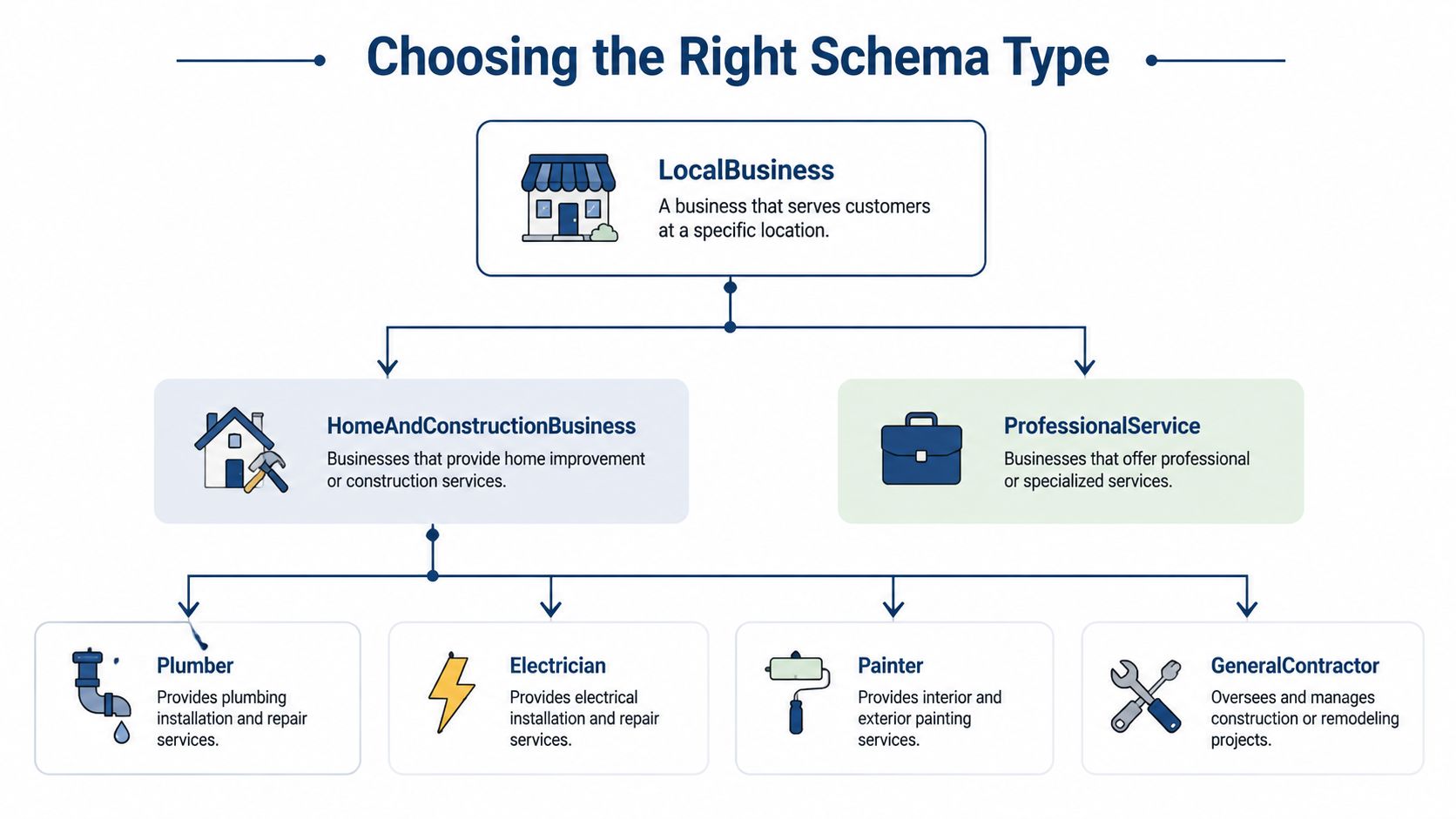
Start with the business model, not the code. Google recommends using the most specific LocalBusiness subtype available, so a dental practice should use Dentist rather than hiding behind a generic label (Google's LocalBusiness structured data documentation). Specificity helps machines distinguish a dental practice from a building firm, a restaurant or a general organisation.
Build the entity graph first
Before writing JSON-LD, list the entities your website contains:
- Organisation: The parent company, brand name, logo, website and official identity.
- Local entity: Each real branch, office, clinic, shop or service location.
- Service: The work described on a service page, such as emergency plumbing or conveyancing.
- Person: A named solicitor, dentist or practitioner where the page identifies that person.
- Web page: The page that explains the entity, with a canonical URL and visible relationships.
A single-branch plumber in Leeds might connect an Organisation to a Plumber entity and then to Service pages for boiler repairs and burst pipes. A multi-location plumbing firm shouldn't place every branch inside one vague company-wide object. Google guidance recommends location-level details for local businesses, particularly where branches have different hours or telephone numbers (Google's organisation and local-business guidance).
Match schema to page purpose
Use the page itself as the deciding factor. The homepage can establish the organisation and primary local entity. A branch page should describe that branch. A service page should explain the service and identify the provider. A solicitor's wills page shouldn't pretend to be a generic article because the CMS has automatically added Article markup.
For hospitality, a café should use the relevant food-service subtype where appropriate, with opening hours and address matching the page. For professional services, a law firm can use a specific legal-service subtype where it reflects the actual business. For trades, a plumber, electrician or builder should use the most precise available subtype rather than a generic Organization object doing all the heavy lifting.
Entity-first test: If a customer changed the branch phone number, service area or opening hours, could you update the correct entity without rewriting the whole site-wide graph?
That test exposes messy implementations quickly. It also keeps the markup maintainable when a firm opens a second office, moves premises or separates emergency and planned services.
Writing and Placing JSON-LD Markup in Your CMS
JSON-LD is the practical format of choice because it sits in a separate script block rather than being woven through visible HTML. Inline Microdata can work, but it ties structured attributes to page elements, making routine content edits more fragile. JSON-LD lets a developer update an opening hour or @id without redecorating the page like a particularly anxious wedding venue.
Before adding anything, inspect the existing output. WordPress themes, Rank Math, Yoast SEO and other plugins may already emit Organization, WebSite, BreadcrumbList or local-business data. Adding a second block isn't automatically wrong, but duplicate fragments can create conflicting graphs and reduce eligibility.

A local plumber example
This example shows the shape of a local entity and a connected service. Replace every value with information visible on the relevant page.
<script type="application/ld+json">
{
  "@context": "https://schema.org",
  "@type": "Plumber",
  "@id": "https://example.co.uk/#plumber",
  "name": "Leeds Boiler & Plumbing",
  "url": "https://example.co.uk/",
  "telephone": "+44 113 000 0000",
  "address": {
    "@type": "PostalAddress",
    "streetAddress": "Example Street",
    "addressLocality": "Leeds",
    "postalCode": "LS1 1AA",
    "addressCountry": "GB"
  },
  "openingHoursSpecification": {
    "@type": "OpeningHoursSpecification",
    "dayOfWeek": [
      "Monday",
      "Tuesday",
      "Wednesday",
      "Thursday",
      "Friday",
      "Saturday"
    ],
    "opens": "08:00",
    "closes": "18:00"
  },
  "hasOfferCatalog": {
    "@type": "OfferCatalog",
    "name": "Plumbing services",
    "itemListElement": [
      {
        "@type": "Offer",
        "itemOffered": {
          "@type": "Service",
          "@id": "https://example.co.uk/boiler-repair/#service",
          "name": "Boiler repair",
          "provider": {
            "@id": "https://example.co.uk/#plumber"
          }
        }
      }
    ]
  }
}
</script>
The @id gives the plumber a stable identity. The service points back to that identity instead of creating another business object with slightly different contact details.
A high-street solicitor example
A solicitor's service page should reflect the legal service being offered and the firm providing it. Don't add review properties unless the reviews and count are visible and accurate.
<script type="application/ld+json">
{
  "@context": "https://schema.org",
  "@type": "LegalService",
  "@id": "https://example.co.uk/conveyancing/#legalservice",
  "name": "Bristol Property Conveyancing",
  "url": "https://example.co.uk/conveyancing/",
  "provider": {
    "@type": "Organization",
    "@id": "https://example.co.uk/#organisation",
    "name": "Example Solicitors"
  },
  "areaServed": {
    "@type": "City",
    "name": "Bristol"
  },
  "serviceType": "Residential conveyancing"
}
</script>
These examples are intentionally modest. A clean, truthful graph beats a sprawling block stuffed with irrelevant properties. Place the script in the document head where your CMS permits it, or in the body if that is how the platform manages structured data. In WordPress, use one controlled plugin or a carefully managed template. In a custom site, have the development team generate JSON-LD from the same source data used to render the page.
Testing and Validating Your Structured Data
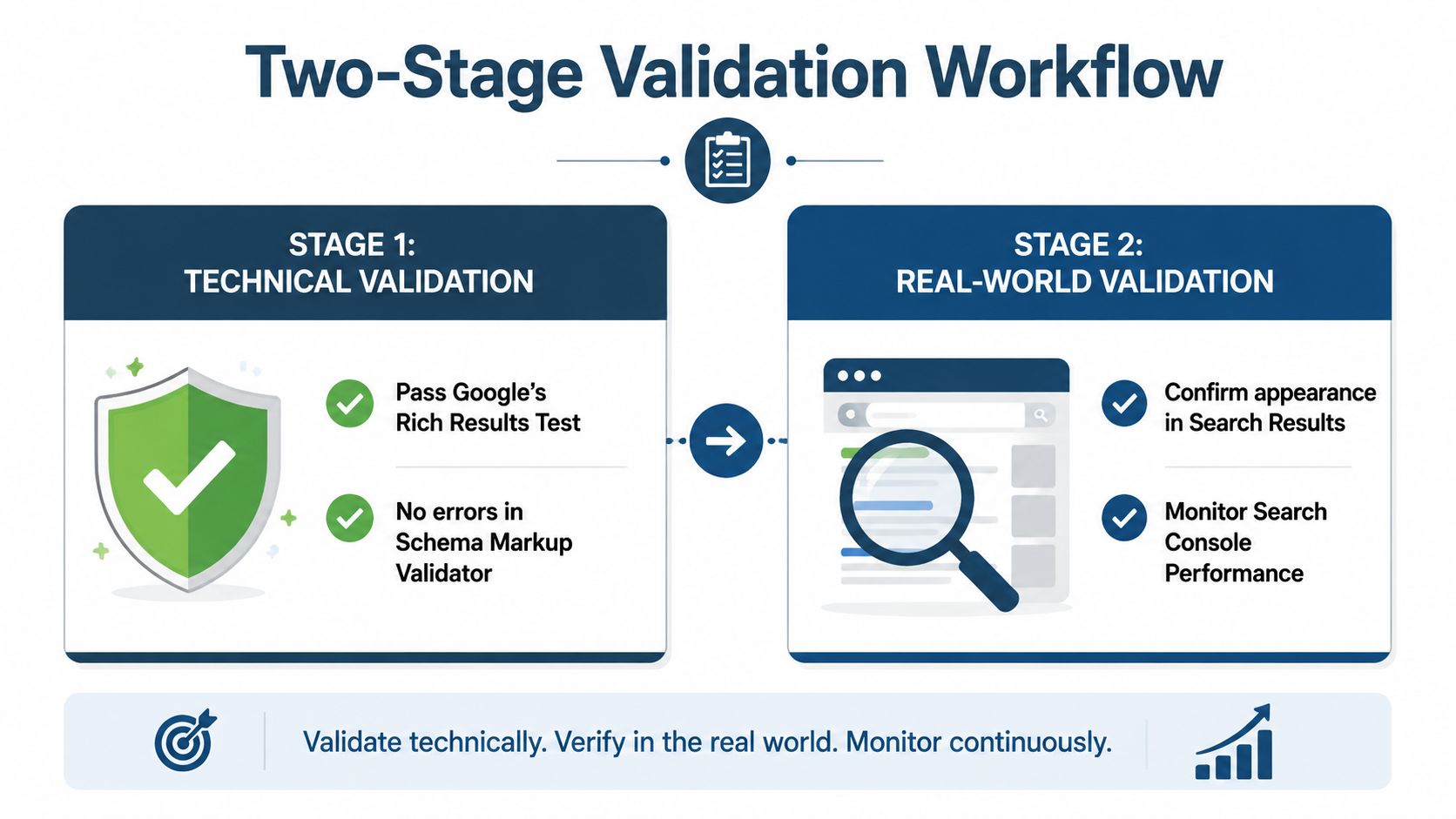
A validator can confirm that markup is syntactically and semantically acceptable. It cannot promise a rich result. Technical validity and search eligibility are separate checks, and both need testing before tidy JSON-LD earns its place on a live service page.
Stage one checks the vocabulary
Start with the Schema Markup Validator. It checks whether properties belong to the selected type, values use acceptable formats, and nested entities are coherent. A missing @type, incorrect nesting, or invalid property value points to a graph that needs repair.
Run Google's Rich Results Test separately. It checks eligibility for supported Google search features, which Schema.org validation does not establish.
A green technical result does not guarantee a rich result. It confirms that the markup has passed the first gate.
Stage two checks Google's interpretation
Use the Rich Results Test with the live URL where possible. Confirm that Google detects the intended type, required properties are present, and the page meets the feature's content requirements. A local service page can still fail if reviews are hidden, the review count does not match what visitors can see, or the telephone and address differ across the page.
After deployment, use Google Search Console's URL Inspection to check how Google renders the page. Enhancement reports support ongoing monitoring. A wider review, such as this local SEO audit resource, can expose inconsistencies between structured data, visible copy, directory citations, and local business details.
Check these faults before closing the ticket:
- Duplicate entities: Remove overlapping plugin and template output, then retain stable
@idreferences. - Invisible reviews: Mark up only reviews displayed to users on the page.
- Wrong subtype: Replace generic
LocalBusinessorOrganizationwith the most specific accurate subtype. - Stale details: Keep opening hours, telephone numbers, and addresses consistent wherever they appear.
- Unsupported expectations: Treat valid FAQ markup as useful content structure, not a guaranteed rich result. FAQ rich results are no longer a dependable general-business outcome.
Validate again after template, plugin, or business-detail changes. The supporting video provides a visual walk-through of the process.
Which Schema Types Still Matter in 2026
Schema selection now needs restraint. Current guidance records 31 rich result schema types as of March 2026 (current structured-data strategy guidance), but a service business rarely needs all of them. Keep markup that explains the organisation, location, services, page hierarchy and any search feature the page qualifies for. Remove types added merely because a plugin offered them.
Organisation remains the foundation for entity identity, even without a prominent visual result on every page. It should connect the business name, logo, website and relevant locations where those details are accurate. FAQPage needs tighter expectations. Publish useful questions and answers for visitors, and mark them up only when the visible content and current eligibility support it. For most commercial service sites, FAQ rich results are no longer a dependable outcome.
| Schema Type | Rich Result Eligible | Priority | Action |
|---|---|---|---|
LocalBusiness and specific subtypes | Where Google eligibility and page quality requirements are met | High | Keep and make the subtype precise |
Organisation | Supports entity identity and eligible features where applicable | High | Keep on the appropriate core page |
Service | Useful for describing a real service and its provider | High | Keep on relevant service pages |
BreadcrumbList | Supported where page hierarchy is clear | Medium | Keep on interior pages |
WebSite | Supports site-level understanding and search features where eligible | Medium | Keep if accurate and controlled |
FAQPage | Restricted outside government and health verticals | Low for most service firms | Keep visible FAQs, rewrite or remove rich-result expectations |
Review and AggregateRating | Eligibility depends on accurate, visible review content | Conditional | Use only where the page and guidelines support it |
HowTo | Its former rich-result treatment is no longer a sensible target | Low | Do not prioritise for search features |
Generic Article on a service page | Not a substitute for service or local-business meaning | Low | Remove or correct when the page is not editorial |
Keep the graph useful
A local dentist should connect its specific local type with the correct address, opening hours and services. A multi-branch firm needs separate branch entities, each linked to its own location page rather than one vague business node. A solicitor can mark up visible FAQ content to clarify client questions, while treating any rich-result benefit as conditional.
The practical target is a smaller graph that stays accurate. It should identify the business, show where it operates, describe what it provides and explain how each page fits into that structure. AI systems may interpret those relationships, but schema alone does not secure citations or replace clear service content.
Schema Markup and AI Search Visibility
The claim that schema guarantees visibility in AI Overviews, ChatGPT or other generative search systems is overstated. One UK-oriented source discusses structured data alongside AI citation monitoring and manual AI Mode sampling, while another says there is no special schema required for generative AI search (UK discussion of schema and AI citation monitoring). Those positions aren't necessarily enemies. They highlight the difference between making information easier to interpret and proving that markup caused a citation.
Schema can support machine-readable identity and relationships. It can make it clearer that a business in Sheffield offers conveyancing, that a clinic has a particular location, or that a service page belongs to a named organisation. That foundation may help systems read the site consistently, but it won't compensate for weak content, contradictory business details or a poor reputation.
Measure the useful signals
Treat AI visibility as an observation exercise, not a promise. Maintain a list of brand and topic queries, sample them in relevant AI search experiences, and record whether the business appears accurately, whether the cited page is the right one and whether its services or location are described correctly. Keep traditional checks alongside that work, including Rich Results Test outcomes, Search Console coverage and organic impressions.
A practical monitoring sheet can include:
- Entity accuracy: Is the business name, location and service described correctly?
- Citation quality: Does the system reference the relevant service or location page?
- Visibility consistency: Does the business appear for more than one wording of the same need?
- Technical health: Has a CMS change introduced duplicate or invalid markup?
For broader context on efforts to improve AI search visibility, look for monitoring methods rather than grand guarantees. Schema is best treated as technical hygiene that supports clear communication. It deserves a place in the foundation, but not the entire budget.
Your 30-Day Schema Rollout Plan and Troubleshooting Guide
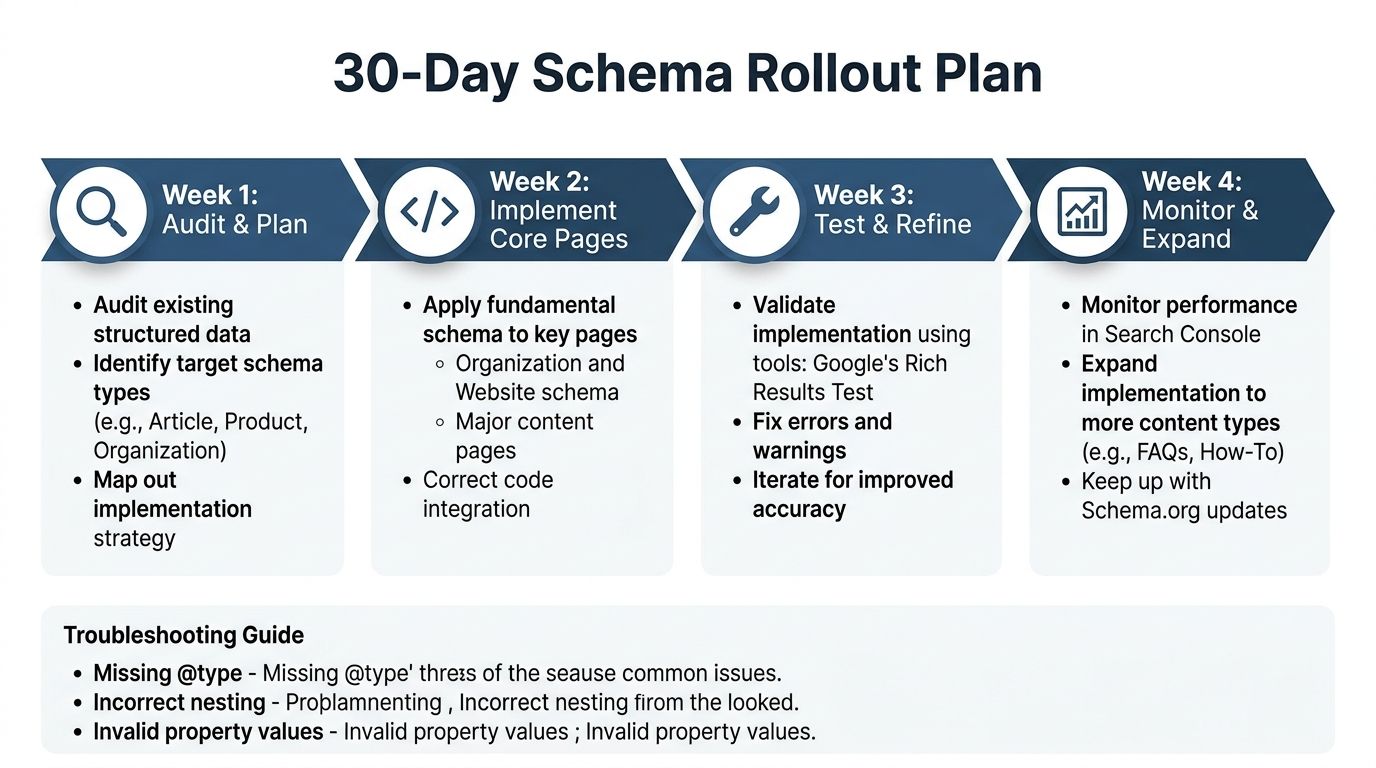
A sensible rollout starts with restraint. During the first week, audit existing output in the CMS, list every page type and map the organisation, branches, services and people. Don't deploy a fresh schema block until you know what the theme and plugins already generate.
Four weeks of practical work
- Week one, audit and plan: Crawl core pages, inspect current JSON-LD and document canonical
@idvalues. - Week two, implement core pages: Deploy controlled JSON-LD for the homepage, primary location pages and key service pages.
- Week three, test and refine: Run Schema Markup Validator, Rich Results Test and URL Inspection. Fix errors before expanding.
- Week four, monitor and expand: Review Search Console enhancement reports, check visible-page alignment and add secondary entities only where they earn their place.
Common faults are usually mundane. Missing @type means the object isn't identifiable. Incorrect nesting places a service, review or address under the wrong parent. Invalid property values often come from copied examples rather than real business data.
Technically valid markup can still produce no visible rich result. That may reflect eligibility limits, Google's decisions, page quality or a feature that no longer exists. Remove obsolete expectations, keep the visible content useful and monitor changes rather than repeatedly adding code in a mild panic.
DigiVisi Ltd audits and implements structured data alongside local SEO, service-page optimisation, citations and Google Business Profile work for UK service businesses. Visit DigiVisi Ltd to discuss an entity-first schema plan that matches your pages, branches and actual customer journeys.