Skip to content
You've checked the phone, the website works, and the van is out on the road. Yet a customer searching for “emergency plumber Bristol” calls a competitor whose Google listing looks as if it was assembled during a tea break. Their profile appears in Maps, the hours are clear, the call button is obvious, and yours is missing a service, an image, or the right category.
That's the practical reality of Google Business Profile setup in the UK. A profile isn't a static directory entry. It's a live performance channel that can generate calls, directions, website visits, bookings, messages and qualified enquiries when the underlying information is accurate and maintained. Google's own UK Business Profile page confirms that businesses can see which keywords people use to find them and track calls, reviews, bookings and other customer actions through the profile (Google Business Profile).
Table of Contents
- Why GBP Setup Now Matters More Than Ever for UK Service Businesses
- Choosing Categories, Attributes and Services That Actually Rank
- Messaging, Booking, Photos and the Stuff That Converts
- White Hat, Grey Hat and Black Hat
- Setting Up Multi-Location Profiles Without Triggering Duplicates
- Verification Problems and How to Actually Fix Them
- Tracking, Next Steps and a 90-Day GBP Plan
Why GBP Setup Now Matters More Than Ever for UK Service Businesses
A Bristol plumber with a polished website can still lose a lead if a less organised competitor occupies the more prominent Maps position. The searcher rarely cares who has the prettier brochure. They care who appears nearby, covers their postcode, answers the phone and can attend before the boiler develops a personality of its own.
Google Business Profile now sits across several customer journeys at once. It supports visibility in Google Search and Maps, provides operational details for people ready to make contact, and supplies business information that can appear in newer AI-mediated search experiences. Google added WhatsApp and text messaging to Business Profiles in April 2025, introduced a chat-click metric in the Performance tab, and changed how views are counted as unique-user views, as recorded in Google's April 2025 Business Profile update (Google's Business Profile update).
That change matters to UK service businesses because the profile has become a contact interface, not merely a citation. A Manchester roofer may receive a call from someone who found the listing in Maps, a message from someone who prefers WhatsApp, and a website enquiry after a customer compared photos and reviews. Those actions happen inside the same Google ecosystem, but they need different tracking and response processes.
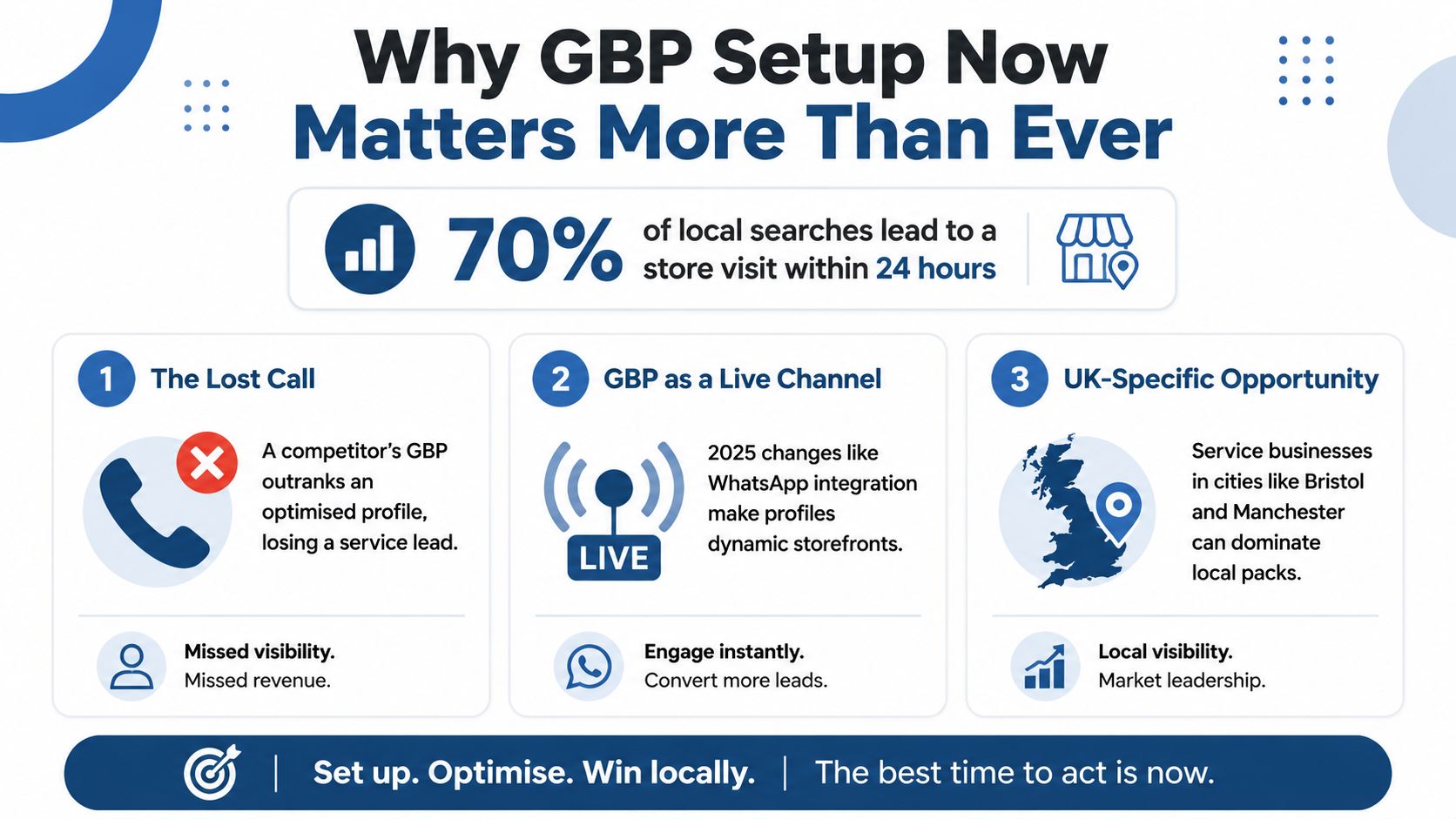
UK local SEO reporting commonly notes that 70% of GBP profile views come from Google Maps, while 84% of discovery searches are category-, product-, or service-led rather than branded (UK local SEO statistics). In other words, a customer doesn't need to know “Harris Heating” before finding a heating engineer. They can search for the service, compare the available profiles and choose the business that looks most relevant and trustworthy.
The same source reports that 42% of Map Pack clicks go to the top-listed business (UK local SEO statistics). That doesn't mean ranking alone wins the job. A profile with the wrong hours, no photos or an unclear service area can waste the visibility it earns. Setup quality affects whether a searcher calls, requests directions, visits the website or abandons the search.
Build the profile in the right order
Start with a dedicated Google account controlled by the business, rather than leaving ownership tied to a personal Gmail account belonging to a former employee or a helpful cousin. Go to Google Business Profile Manager and claim an existing listing or create a new one.
Prepare the core NAPW details:
- Name: Use the name customers recognise on signage, stationery and other real-world branding. Don't turn “North Leeds Electrical” into “Best Emergency Electrician North Leeds 24/7”.
- Address: Use the genuine trading location where the business is eligible to receive customers or operate as a recognised business.
- Phone: Use the number customers answer. A tracking number can create consistency problems if it appears nowhere else.
- Website: Link to the most relevant page, usually the main service or location page rather than a generic homepage.
Google says a profile should represent the business as it's consistently recognised in the world, and it warns against duplicate profiles for the same business (Google's business representation guidelines). Companies House information can help confirm the legal entity, but the profile name should still reflect the public-facing name customers see.
Choose between a storefront and a service area
A service-area business visits or delivers to customers directly but doesn't serve them at its business address. Google's guidance says these businesses should hide the address from customers and define the service area instead (Google's service-area guidance).
For a mobile electrician in Leeds, showing a residential address can create confusion, privacy concerns and an awkward queue of strangers asking for a fuse replacement. A legitimate office where clients attend is a different case. Choose the model that reflects how the business operates, not the option that looks more convenient for rankings.
Google recommends completing and verifying the profile before using Performance reporting. The dashboard is available to verified profiles, and it can show calls, direction requests, website clicks and search views (Google Performance guidance).
Use this sequence:
- Business name.
- Primary category.
- Phone number and website.
- Service area or physical location choice.
- Address, where applicable.
- Verification.
- Performance review and conversion tracking.
Verification methods vary by profile. Some UK businesses may be offered postcard, phone, email, video or live video options. Don't make a burst of major edits while verification is underway, and don't connect Google Ads or Merchant Center until the profile is verified and stable. A glossy brochure won't answer the phone. A properly configured profile might.
Choosing Categories, Attributes and Services That Actually Rank
Category selection is one of the most impactful decisions in a UK profile because it tells Google what the business is. Choose the category that describes the main commercial service, not the broadest label that sounds impressive.
Search the target query in an incognito window and inspect the top local results. If an electrician in Leeds consistently appears under Electrician, choosing “Contractor” because it feels more flexible is usually a poor trade-off. A Manchester solicitor might use Lawyer or a more specific legal category as the primary choice, then add relevant secondary categories such as family law or conveyancing where those options accurately describe the work.
| Business Type | Primary Category | Secondary Categories | Rationale |
|---|---|---|---|
| Leeds electrician | Electrician | Emergency electrician, lighting contractor, where available and accurate | Matches the main service and supports distinct customer needs |
| Manchester solicitor | Solicitor or the closest accurate legal category | Family law, conveyancing, employment law, where applicable | Separates genuine practice areas without stuffing the profile |
| Bristol plumber | Plumber | Bathroom fitter, heating contractor, drain service, where genuinely offered | Connects core plumbing work with related services |
| Sheffield pest controller | Pest control service | Wildlife control, bird control, rodent control, where accurate | Reflects the jobs customers actually search for |
Attributes add useful context, particularly where they affect a customer's decision. Select genuine characteristics such as women-owned, veteran-led, wheelchair access or sustainability-related attributes when Google offers them and the business can substantiate them. Don't tick every available box in the hope that enthusiasm counts as evidence.
The Services section works best as a structured inventory. Add “boiler repair”, “consumer unit replacement” or “leasehold conveyancing” only when the business provides that service. Then map each important item to a useful page on the website, so the profile and site reinforce the same topical structure.
Hours are operational trust signals. Add normal hours, emergency availability where it exists, and Special Hours for bank holidays and planned closures. A solicitor advertising an appointment slot that clashes with a holiday closure creates unnecessary frustration. A plumber who appears open on Boxing Day may receive a review from someone who found a locked door, which is a festive tradition nobody needs.
Messaging, Booking, Photos and the Stuff That Converts
A profile can rank well and still convert badly. The customer needs an obvious next action, and the business needs a reliable way to handle it.
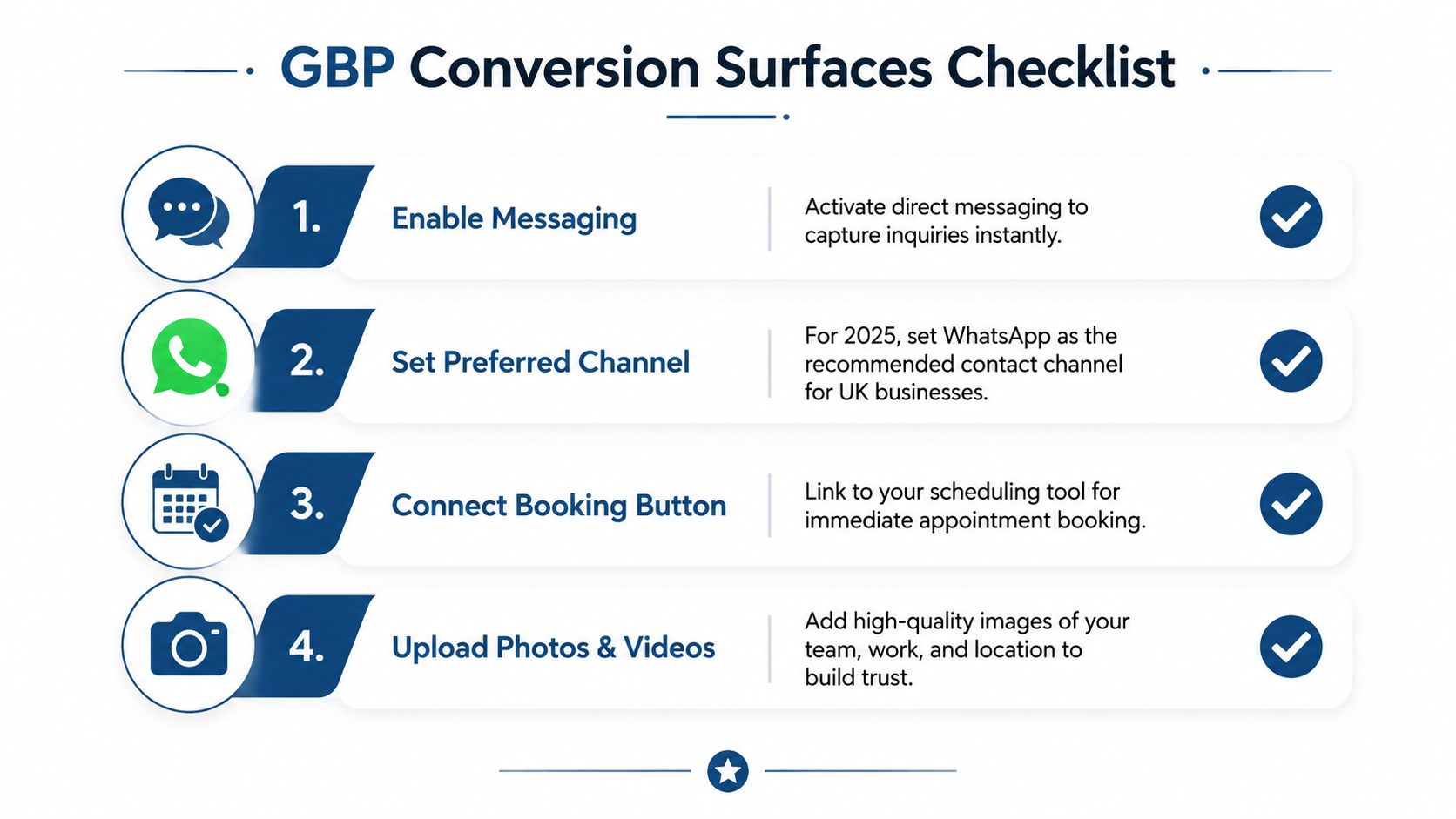
Start with messaging. Google's 2025 update added WhatsApp and text messaging options, so a UK business should choose the channel it can monitor promptly rather than enabling every option and replying whenever the moon is in the correct phase. If WhatsApp suits the audience, use it as the preferred contact route. If calls are essential for emergency work, make the phone action prominent and ensure someone answers it.
Booking links should lead to a working process, not a forgotten calendar. Connect a suitable tool such as Square, Calendly or a native booking form where the service allows appointments. A family solicitor can link to an initial consultation request. A plumber may be better served by a call and message action if diagnosing the problem requires a conversation.
Use photos to remove doubt
Upload a clear logo, a recognisable cover image, the owner or team, completed work and the premises where customers attend. Images don't need to look like a national advertising campaign. They need to be genuine, well lit and useful.
For a plumber, useful images include a branded van, protective equipment, tidy pipework and the engineer at work, with customer privacy respected. For a solicitor, an office exterior, reception area and team photograph can make the first appointment feel less mysterious.
Q&A can also reduce friction. Add useful questions customers regularly ask, such as “Which areas do you cover?”, “Do you provide emergency callouts?” or “Is parking available?” Keep answers factual and written for customers, not stuffed with variations of the same keyword.
Reviews need a clean process. White-hat review generation means asking genuine customers through a follow-up email, SMS, QR code at job completion or a face-to-face request. It doesn't mean offering a discount for a positive review, filtering unhappy customers away from the review link or commissioning reviews from people who haven't used the service.
A practical afternoon checklist looks like this:
- Contact route: Test calls, WhatsApp and messages from a separate device.
- Booking: Submit a test booking and confirm the notification reaches the right person.
- Photos: Add real brand, team, work and location images.
- Questions: Answer parking, coverage, availability and emergency-service queries.
- Reviews: Create a genuine request process and respond professionally to existing feedback.
- Links: Check that the website and appointment URLs open on mobile.
White Hat, Grey Hat and Black Hat
Some GBP advice belongs in the same drawer as miracle diet plans and unsolicited roofing leaflets. It may promise speed, but it usually creates a larger problem later.
Black-hat tactics deliberately misrepresent the business. Examples include using a virtual office as the primary address, stuffing keywords into the business name, creating fake review networks, paying for fabricated activity or using accounts to create shell locations. These approaches can produce a temporary appearance of relevance, but they conflict with Google's requirements for genuine business representation and can lead to suspension.
Grey-hat tactics sit in the uncomfortable middle. Bulk citation blasts can create messy duplicate records. Exact-match review responses can look robotic. AI-generated descriptions may be serviceable drafts, but publishing them without editing often produces bland copy that says very little about the business. A brief ranking lift isn't a sound strategy if the profile then flatlines or loses trust.
White-hat work is less theatrical and considerably more durable:
- Accurate service areas: Show where the business operates, rather than creating a profile for every town.
- Natural descriptions: Explain the service, customer type and areas covered in plain English.
- Real reviews: Ask customers who completed a transaction, without incentives or review-gating.
- First-hand evidence: Use owner information, real photographs, useful updates and clear service details.
- Consistent information: Keep the profile, website and important directories aligned.
Google's Business Profile information can also support AI-generated search experiences, including attributes, opening hours and review-related context. That makes accuracy more important, not less. An AI Overview can't rescue a business whose profile says it offers wheelchair access when the premises clearly doesn't, or whose hours send a customer to a closed office.
| Tactic | Example | Risk Level | Likely Outcome |
|---|---|---|---|
| Virtual office address | Listing a mailing address where customers aren't served | High | Verification difficulty, suspension or loss of trust |
| Keyword-stuffed name | Adding “24 Hour Best Plumber Bristol” to the real name | High | Policy risk and an unnatural customer experience |
| Incentivised reviews | Offering money or discounts for reviews | High | Policy breach and unreliable reputation signals |
| Bulk citations | Uploading the same data to large numbers of low-quality directories | Medium | Inconsistent records and limited lasting value |
| AI-written description | Publishing unedited generic copy | Medium | Weak differentiation and poor customer persuasion |
| Genuine review request | Sending a neutral review link after completed work | Low | Compliant feedback and useful social proof |
| Real job updates | Posting authentic team, service and project information | Low | Better context for customers and search systems |
The sensible approach is to make the profile easy for Google and customers to understand. No Telegram wizardry required.
Setting Up Multi-Location Profiles Without Triggering Duplicates
A heating company with depots in Manchester, Leeds and Liverpool can create a strong multi-location structure, provided each profile represents a genuine eligible location. The mistake is creating one profile for every town covered by the engineers. Google's rule is one profile per business location, not one profile per service area.
A solicitor with two offices should therefore maintain two legitimate profiles, each with its own address, phone details where appropriate, hours, photographs and local service information. A mobile heating engineer with one real base shouldn't create separate profiles for Manchester, Salford, Stockport and every surrounding postcode just because the van visits them.
Keep ownership and access tidy
Use a central business account for ownership, then grant managers the access they need. Agencies and in-house teams shouldn't rely on one shared password. If ownership needs to move between accounts, use Google's access and ownership controls rather than starting a replacement profile and leaving the original behind.
For a larger group with 10 or more locations, Google provides a bulk-management route through Business Profile tools. Smaller operators generally verify locations individually. The principle remains the same in both cases, every location needs genuine supporting information and its own verification process.
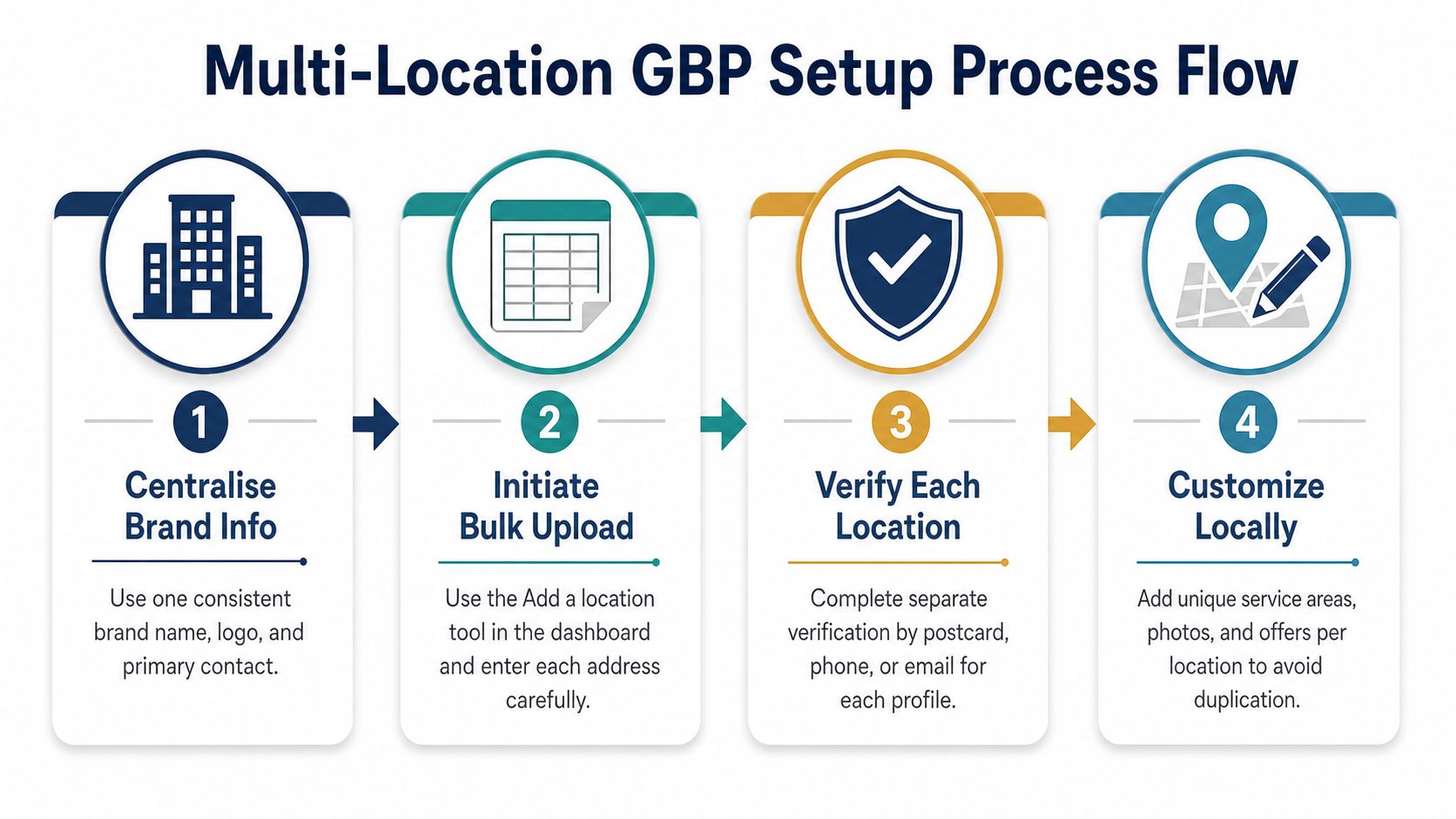
Prepare a launch sheet before uploading anything:
- Centralise brand information: Agree the public business name, logo, contact format and website structure.
- Check each location: Confirm the address, signage, opening hours and customer access.
- Assign ownership: Add the business owner first, then managers or agencies with appropriate permissions.
- Customise locally: Use genuine local photographs, location-specific services and accurate service areas.
- Verify separately: Treat each location as its own operational listing.
- Audit after launch: Check Maps, Search, calls, directions and website links for every profile.
A rogue profile created by a franchisee needs investigation, not a second rogue profile created in response. Search for duplicates, request access or ownership where appropriate, and document the evidence showing which location is genuine. Google explicitly warns that duplicate profiles can cause information-display problems in Search and Maps (Google's representation guidelines).
Consistent core information matters, but every profile should still have local substance. Copying the same description, photographs and service list across every location makes the group look automated. A shared brand can be consistent without becoming beige.
Verification Problems and How to Actually Fix Them
Verification problems usually come from a mismatch between the profile and the business, not from Google having a personal grudge against your boiler installation company.
A postcard can fail because Royal Mail delivers it to the wrong trading address, a suite number is missing above a shop, or the postcode doesn't align with Google's records. Don't keep changing the address while waiting. Check the exact trading details, confirm the premises can receive business correspondence and follow the verification option Google provides.
Video verification causes trouble for service-area businesses when the operator can't demonstrate that the business exists. A mobile electrician should be ready to show branded tools, equipment, vehicle details, business materials and evidence that the person recording is authorised to manage the profile. A virtual office and a confident wave at an empty desk won't establish much.
Treat a suspension as a diagnosis
A soft suspension can appear after a sudden burst of edits, especially where the business name, address and category all change together. Stop making random changes. Review the profile against Google's representation rules, identify the mismatch, correct the underlying facts and then submit a reinstatement request with coherent evidence.
Useful evidence may include utility bills, Companies House records, vehicle branding, business insurance or other documents that connect the business to its real operation. Only provide documents that support the profile. A pile of unrelated paperwork doesn't improve an appeal.
| Problem | Likely UK cause | Fix that works |
|---|---|---|
| Postcard doesn't arrive | Incorrect trading address, missing unit detail or postcode mismatch | Confirm the eligible address, correct the record and use the available replacement process |
| Video verification fails | No visible signage, equipment or proof of management | Record the real operation, premises or service vehicle and business evidence clearly |
| Profile disappears after edits | Sudden changes create a trust or eligibility review | Stop editing, compare details with real-world evidence and request reinstatement |
| Address is rejected | Virtual office, PO box or unsuitable customer location | Use an eligible real-world business location or configure a genuine service-area profile |
| Name is denied | Keywords added to the recognised business name | Remove promotional wording and match signage and public branding |
| Duplicate appears | A second profile was created for the same location | Request access, remove the duplicate route and retain the legitimate profile |
Google's verification guidance confirms that Performance reporting is available to verified profiles and that the profile should be completed before relying on performance data (Google's Performance guidance). That makes verification more than a tick-box. It's the point at which the business can start building a reliable baseline.
Tracking, Next Steps and a 90-Day GBP Plan
A live profile needs a measurement loop. Open the Performance area in Business Profile Manager or Google Maps and review search views, calls, direction requests, website clicks and messaging activity. Google's updated reporting includes chat clicks, while its view-counting changes mean owners should avoid comparing every historical figure as if the measurement method stayed identical (Google's April 2025 Business Profile update).
Separate discovery from conversion. Branded searches indicate that people already know the business. Non-branded searches show whether the profile is reaching people looking for “family solicitor Manchester”, “boiler repair Leeds” or another service-led query. Add UTM parameters to website and booking links where possible, and use call tracking carefully so the business doesn't damage NAP consistency.
A practical plan:
- First 30 days: Confirm every field, test the phone and message actions, request genuine reviews after completed work, respond to existing feedback and add useful photographs.
- Days 31 to 60: Publish authentic updates about real jobs and seasonal services. Clean inconsistent business details across Yell, Thomson Local and relevant UK directories. Review search terms and compare them with the services listed on the profile.
- Days 61 to 90: Refine service areas based on genuine operating coverage, improve Q&A with customer-led questions and connect profile activity with enquiries and booked work.
For owners who need broader local-search support, small-business local SEO guidance can help place GBP work alongside website structure, citations, reviews and conversion tracking.
The important measure isn't whether the profile looks busy. It's whether the right customer can find the business, understand the offer, choose a contact route and receive a prompt response. Google Business Profile setup starts the process, but disciplined maintenance turns visibility into actual commercial value.
DigiVisi Ltd provides Google Business Profile optimisation, competitor-led local SEO analysis, citation and NAPW corrections, review processes and conversion tracking for UK service businesses. Visit DigiVisi Ltd to discuss a practical profile setup and maintenance plan built around calls, enquiries and sales.